Gainio: An In-Depth Technical Review and Developer's Installation Guide - Download
Gainio: An In-Depth Technical Review and Developer's Installation Guide
The gaming and eSports industry continues its explosive growth, demanding web presences that are both visually compelling and technically robust. In this demanding landscape, developers often seek specialized templates to accelerate their projects. Today, we’re dissecting a prime contender in this niche: Gainio - eSports and Gaming HTML Templates. This comprehensive review will delve into Gainio's architecture, design philosophy, and practical application, followed by a detailed installation and customization guide, all from the perspective of a seasoned web developer and technical journalist.
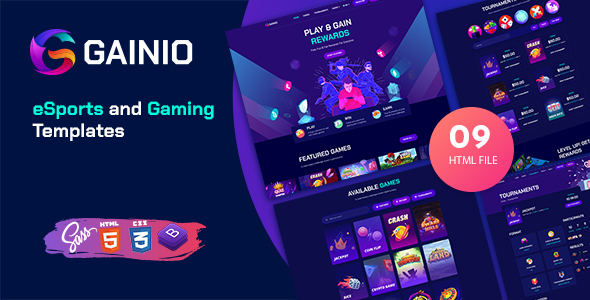
Initial Impressions: Design & Target Audience
Upon first glance, Gainio makes a strong visual statement. It’s immediately clear this template is purpose-built for the eSports and gaming community. The color palettes lean heavily into dark modes, accented by vibrant, often neon, highlights – a common aesthetic preference within this demographic. Typography choices are bold and modern, ensuring readability against complex backgrounds. Layouts prioritize dynamic content, with ample space for hero banners, team rosters, match schedules, and news feeds. From a purely aesthetic standpoint, Gainio successfully captures the aggressive, competitive spirit of eSports, suggesting it's aimed squarely at tournament organizers, gaming clans, streamers, and eSports news portals looking for a ready-made, high-impact design.
However, an attractive façade is only one piece of the puzzle. As developers, our interest quickly shifts from "what it looks like" to "how it's built" and "how easily can it be maintained and extended."
Dissecting the Codebase: Structure, HTML, CSS, and JavaScript
HTML Structure and Semantic Markup
A template’s foundation lies in its HTML. Gainio presents a fairly standard modern HTML5 structure. We see <header>, <nav>, <main>, <section>, <article>, and <footer> elements used, which is a good sign for accessibility and SEO. Divs are still prevalent, as expected, but appear to be used for structural purposes and component wrapping rather than gratuitous layering. A quick scan reveals reasonable use of classes, though some elements might benefit from more semantic naming where possible, moving beyond purely presentational classes like dark-background or text-center to more functional ones like match-card or player-profile.
The template generally avoids inline styles, preferring external CSS, which is crucial for maintainability. There's a decent modularity in the HTML, with repeating components like team cards, match listings, and news blocks appearing consistent across different pages, suggesting a component-based approach was considered during development. This modularity simplifies content population and design iteration.
CSS Architecture and Styling
CSS is where the visual magic happens, but it’s also where performance bottlenecks and maintainability nightmares can originate. Gainio utilizes a combination of custom CSS and, as is common, a framework. Upon inspection, it appears to leverage Bootstrap, or a heavily customized version thereof, for its foundational grid system and UI components. This is a pragmatic choice, as Bootstrap provides a solid, well-documented base for responsive design.
Beyond the framework, the custom CSS is organized into multiple files (e.g., style.css, responsive.css, colors.css). This separation is commendable, allowing developers to quickly locate and modify specific aspects of the design. However, the depth and breadth of these files can sometimes lead to CSS bloat, where many rules might override each other or become redundant. A more rigorous adherence to methodologies like BEM (Block Element Modifier) or a utility-first approach (like Tailwind CSS) could further enhance clarity and reduce file size, though implementing either retrospectively is a significant undertaking.
One potential area for critique is the extent of customization over the base framework. While Gainio successfully gives Bootstrap a distinct gaming personality, this often means deep overrides. Developers looking to integrate new Bootstrap components might find themselves fighting existing Gainio styles, requiring careful investigation of specificity issues. The use of CSS variables (custom properties) could significantly improve themeability and reduce the need for deep, repetitive overrides, making it easier to globally adjust colors, fonts, and spacing.
JavaScript Implementation and Interactivity
Modern web templates are inherently interactive, and Gainio is no exception. It incorporates a range of JavaScript-driven features: sliders (likely Swiper.js or Owl Carousel), countdown timers for upcoming matches, interactive tabbed content, lightboxes for image galleries, and smooth scrolling effects. jQuery is present, which is still a workhorse for many web projects, though newer projects often gravitate towards vanilla JavaScript or modern frameworks for performance and reduced dependency footprint.
The JavaScript files are typically found at the bottom of the <body> tag, a best practice for ensuring page content loads before scripts execute, improving perceived performance. The code appears relatively structured, with functions wrapped to avoid global scope pollution. However, without a detailed examination of the source, it's difficult to assess potential performance bottlenecks arising from complex animations or overly eager event listeners. Developers should be prepared to audit these scripts, especially for mobile performance, to ensure they aren't causing unnecessary jank or long task times.
From a usability standpoint, the interactive elements are generally intuitive and enhance the user experience. The countdown timers create urgency, and the sliders effectively showcase large amounts of content without overwhelming the page. For highly interactive sites, ensuring these scripts are robust and cross-browser compatible is paramount.
Features Deep Dive: Pages, Components, and UX
Gainio boasts a substantial collection of pre-designed pages, which is a major time-saver. We typically find:
-
Homepages: Multiple variations, often with different hero sections (video backgrounds, image sliders, static content).
-
About Us/Team Pages: For introducing organizations, players, or staff.
-
Match/Tournament Pages: Detailed layouts for schedules, brackets, results, and team matchups. This is a core strength.
-
Player Profile Pages: Dedicated layouts for individual player statistics, achievements, and social links.
-
News/Blog Pages: List and single post layouts, essential for content marketing.
-
Shop Pages: Basic e-commerce layouts (product listings, single product details), typically placeholder content, as it's an HTML template, not a functional store.
-
Contact Pages: With forms and map integrations.
-
Utility Pages: 404 error, coming soon, login/register forms.
Beyond full pages, the template provides a rich set of reusable UI components. These include: buttons, accordions, tabs, carousels, progress bars, social icons, custom forms, and various card layouts optimized for player profiles, game summaries, or news snippets. The consistency in component styling across the template is a testament to its design system, allowing for rapid assembly of new layouts.
The overall User Experience (UX) benefits from these structured elements. Navigation is typically clear, with prominent menus and calls to action. The template uses visual cues effectively to guide users through content. However, potential users should consider testing the accessibility features, such as keyboard navigation and screen reader compatibility, as these are sometimes overlooked in purely design-focused templates. Implementing ARIA attributes and ensuring proper heading structure is crucial for inclusivity.
Responsiveness and Performance Considerations
In today's mobile-first world, responsiveness is not a luxury but a requirement. Gainio, leveraging a responsive framework like Bootstrap, handles various screen sizes reasonably well. Layouts fluidly adjust, images scale, and navigation typically transforms into a hamburger menu on smaller devices. Developers should rigorously test the template across a range of devices and orientations, paying close attention to complex layouts like tournament brackets or large tables, which can sometimes break or become unwieldy on very small screens.
Performance is another critical aspect. While an HTML template doesn't come with server-side performance issues, client-side performance is entirely dependent on its build quality. Factors influencing this include:
-
Image Optimization: Large, unoptimized images are common culprits. Gainio provides placeholders, but developers must ensure all production images are properly sized, compressed, and ideally served in modern formats like WebP.
-
CSS and JavaScript Files: The number and size of these files impact load times. While the template bundles them, minification and concatenation are crucial steps during deployment. Gainio's reliance on multiple external scripts (jQuery, sliders, custom scripts) can add to the network requests.
-
Web Fonts: Custom fonts, while aesthetically pleasing, add to download size. Optimizing font loading (e.g., using
font-display: swap) and only loading necessary subsets can help. -
DOM Complexity: A deeply nested DOM tree can slow down rendering. While Gainio appears structured, developers should be wary of adding excessive layers during customization.
Tools like Google Lighthouse or GTmetrix will be indispensable for performance auditing once content is populated and the site is hosted. Aiming for scores above 80 on mobile and desktop should be a minimum target.
Customization Potential and Developer Workflow
An HTML template's true value often lies in its ease of customization. Gainio offers a solid foundation, but developers should be prepared for hands-on work. Changing colors, fonts, and images is straightforward through CSS and HTML modifications. Adding new sections or pages involves copying and adapting existing components.
For extensive customization, a good understanding of HTML, CSS (especially specificity and cascading), and JavaScript is essential. If a developer needs to introduce new dynamic features (e.g., live data fetching, user authentication), they will likely need to integrate a backend framework (Node.js, PHP, Python, etc.) or a headless CMS, transforming this static template into a dynamic application.
The primary challenge with HTML templates like Gainio is their static nature. There's no built-in content management system. This means every content change, from updating a match score to adding a news article, requires direct modification of the HTML files. For small, infrequently updated sites, this is manageable. For larger, dynamic eSports portals, integrating a CMS is almost mandatory. Options range from simple static site generators (like Jekyll, Hugo, Gatsby) that compile markdown into HTML, to more robust server-side CMS platforms.
Developers adopting Gainio for a complex project should consider a workflow that includes:
-
Version control (Git).
-
A local development environment.
-
Possibly a build process (e.g., using Gulp or Webpack) for Sass/SCSS compilation, JavaScript transpilation, minification, and asset optimization.
This transforms the static template into a more manageable, modern development project.
Installation Guide: Getting Gainio Up and Running
Installing an HTML template like Gainio is fundamentally about getting the files onto your server and making them accessible via a web browser. Here's a step-by-step guide.
Step 1: Download and Unpack the Template Files
-
Purchase and Download: Once you've acquired Gainio - eSports and Gaming HTML Templates, you'll receive a
.ziparchive. -
Unzip the Archive: Locate the downloaded
.zipfile on your computer and extract its contents to a new folder. You can usually do this by right-clicking the file and selecting "Extract All" (Windows) or double-clicking (macOS). -
Inspect the Folder Structure: Inside the extracted folder, you'll typically find:
-
index.html(and other HTML pages likeabout.html,matches.html, etc.) -
A
cssfolder (containingstyle.css,bootstrap.css, etc.) -
A
jsfolder (containingmain.js,jquery.js,swiper-bundle.js, etc.) -
An
imagesfolder (for template assets like backgrounds, logos, icons, and placeholder images) -
A
fontsfolder (for custom web fonts) -
Possibly a
documentationfolder (though many HTML templates have minimal documentation beyond basic instructions).
Step 2: Set Up a Local Development Environment (Optional but Recommended)
While you can open index.html directly in your browser, some JavaScript functionalities (like AJAX requests or certain relative path resolutions) might not work correctly due to browser security restrictions. A local web server simulates a real hosting environment.
Option A: Simple Python HTTP Server (Cross-platform)
-
Open Terminal/Command Prompt: Navigate to the root directory where you unzipped Gainio.
-
Run Server Command:
-
For Python 3:
python -m http.server -
For Python 2:
python -m SimpleHTTPServer -
Access: Open your browser and go to
http://localhost:8000(or whatever port is indicated).
Option B: WAMP/MAMP/XAMPP (More Robust)
These packages provide a full Apache, MySQL, PHP environment (or equivalent) for local development.
-
Install: Download and install WAMP (Windows), MAMP (macOS), or XAMPP (Cross-platform).
-
Start Servers: Launch the application and ensure Apache (or Nginx) is running.
-
Place Files: Copy your entire Gainio extracted folder into your web server's document root (e.g.,
wwwfolder for WAMP,htdocsfor XAMPP,htdocsfor MAMP). Rename the folder to something descriptive, likegainio-site. -
Access: Open your browser and go to
http://localhost/gainio-site/(orhttp://localhost:8888/gainio-site/for MAMP by default).
Step 3: Basic Customization and Content Population
With the template running locally, you can begin making changes.
-
Open in a Code Editor: Use a professional code editor like VS Code, Sublime Text, or Atom to open the entire Gainio folder.
-
Edit HTML Files (
.html): -
Navigate to
index.htmland other page files. -
Change text content: Replace placeholder headings, paragraphs, and list items with your actual content.
-
Update links: Modify
<a href="...">tags to point to your internal pages or external resources. -
Replace images: Find
<img src="...">tags. Replace thesrcattribute with paths to your own images. Ensure your images are in theimagesfolder or a new subfolder you create there. -
Modify CSS Styles (
.css): -
Open the main stylesheet (e.g.,
css/style.css). -
To change colors: Search for hex codes (e.g.,
#FF0000) or color names and replace them. You might also find custom CSS variables (if used) at the top of the file. -
To change fonts: Look for
font-familyproperties. Ensure any custom fonts you use are correctly linked in your HTML (<link>tag) or CSS (@importor@font-facerules). -
Make responsive adjustments in
css/responsive.cssif needed. -
Update JavaScript (
.js): -
For simple changes like slider settings or countdown dates, you might edit
js/main.jsor specific plugin configuration files. -
For more complex interactivity, you'll be writing new JavaScript or integrating third-party APIs.
-
Replace Assets: Place your own logos, team photos, game screenshots, and background images in the
imagesfolder. Remember to update the correspondingsrcattributes in your HTML andurl()values in your CSS.
Step 4: Preparing for Deployment
Before uploading to a live server, consider these steps:
-
Optimize Assets:
-
Images: Use image optimization tools (online or desktop) to compress your images without significant quality loss.
-
CSS/JS: Minify your CSS and JavaScript files. Many online tools or build processes can do this, removing whitespace and shortening variable names. This dramatically reduces file size.
-
Test Thoroughly:
-
Browser Compatibility: Test across different browsers (Chrome, Firefox, Edge, Safari).
-
Responsiveness: Check on various devices or use browser developer tools to simulate different screen sizes.
-
Functionality: Ensure all links work, forms submit correctly (you'll need a backend for forms), and interactive elements behave as expected.
-
Accessibility: Perform basic accessibility checks (keyboard navigation, semantic structure).
-
Update
robots.txtandsitemap.xml: Create or update these files for SEO. For a static site,sitemap.xmlcan be generated by various online tools.
Step 5: Deployment to a Live Web Server
-
Choose a Hosting Provider: Select a reliable web host (shared hosting, VPS, dedicated server, or static site hosting like Netlify/Vercel).
-
Access Your Hosting Account: You'll typically get access via cPanel, Plesk, or direct SSH/FTP.
-
Upload Files:
-
FTP/SFTP: Use an FTP client (FileZilla, Cyberduck) to connect to your server. Upload the entire contents of your Gainio project folder (not the folder itself, but its contents) into your web server's public root directory (often
public_html,htdocs, orwww). -
cPanel File Manager: If your host uses cPanel, you can use its built-in File Manager to upload your zipped project and then extract it directly on the server.
-
Set Permissions: Ensure that file and folder permissions are set correctly (typically
644for files and755for folders) to allow the web server to read them. -
Verify: Once uploaded, open your website's URL in a browser to confirm everything is working correctly.
For those looking for an even quicker deployment experience, especially for static sites, modern platforms like Netlify or Vercel offer continuous deployment from Git repositories. You push your changes to GitHub/GitLab/Bitbucket, and they automatically build and deploy your site, complete with global CDN and SSL.
Critical Assessment: Pros and Cons
Pros:
-
Striking Aesthetics: The design is highly thematic and immediately appealing to the eSports demographic.
-
Rich Feature Set: A wide array of pre-built pages and components saves significant development time.
-
Modular Structure: HTML and CSS are reasonably organized, making it easier to locate and modify elements.
-
Responsive Design: Built on a solid framework, ensuring good display across devices.
-
Good Starting Point: Provides a robust foundation for static gaming websites or as a frontend for a custom application.
Cons:
-
Static Nature: As an HTML template, it lacks a CMS, requiring manual HTML edits for content updates, which is cumbersome for dynamic sites.
-
Framework Overrides: Deep customization of Bootstrap might make integration of new Bootstrap components tricky.
-
JavaScript Dependencies: Reliance on jQuery and multiple external libraries could impact performance if not carefully managed.
-
Potential for Bloat: Without aggressive optimization, the combined CSS and JS could lead to larger file sizes and slower load times.
-
Limited Documentation: Like many templates, comprehensive developer documentation might be sparse, requiring code inspection to understand implementations.
-
Accessibility: While visually appealing, specific accessibility features may need developer review and enhancement.
Final Verdict and Recommendations
Gainio - eSports and Gaming HTML Templates stands as a visually impressive and feature-rich option for anyone needing a high-impact gaming web presence. Its strengths lie in its dedicated aesthetics and comprehensive collection of pages and components, making it an excellent starting point for projects where design fidelity to the eSports genre is paramount.
However, developers considering Gainio should do so with a clear understanding of its limitations as a static HTML template. For smaller, brochure-style sites with infrequent updates, it's a superb choice. For large-scale eSports portals, news sites, or communities requiring frequent content updates and dynamic interactions, the template will serve as a strong frontend foundation that must be integrated with a backend system or a static site generator. This conversion from static HTML to a dynamic application requires significant developer effort beyond simple template customization.
For developers who appreciate a strong design language and are comfortable with HTML, CSS, and JavaScript, Gainio provides a significant head start. It saves weeks of design and frontend coding, allowing focus to shift to backend integration or unique interactive features. If you're seeking similar development resources or even explore alternatives, a great place to start looking for high-quality GPL licensed products is the gplpal homepage. And if your project ultimately gravitates towards WordPress for its CMS capabilities, you might be interested in exploring a wide range of options, including Free download WordPress themes, that can give you the flexibility of a CMS with professional designs.
评论 0