Endless Raft 3D: A Technical Deep Dive and Implementation Guide for Unity Developers - Download Free
Endless Raft 3D: A Technical Deep Dive and Implementation Guide for Unity Developers
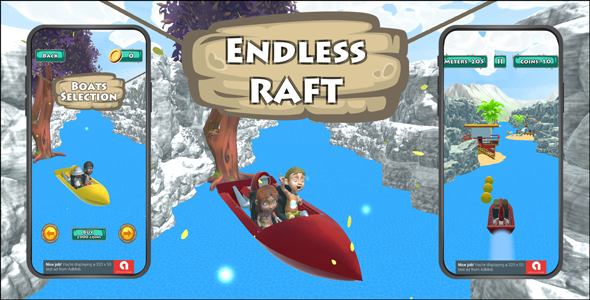
Developing an engaging endless runner, particularly one with a procedural generation component, presents a unique set of challenges in terms of architecture, performance, and scalability. The asset we're examining today, Endless Raft 3D: Unity - Android - iOS, positions itself as a comprehensive starting point for such endeavors, targeting both Android and iOS platforms. As a senior web developer and technical journalist, my interest is less in the surface-level aesthetic and more in the underlying engineering—the code quality, the architectural choices, the optimization strategies employed, and its real-world utility for projects beyond a simple prototype. This review will dissect the asset from a developer’s perspective, providing an in-depth technical analysis and a practical installation and customization guide.
Deconstructing the Asset: Architectural Review and Core Mechanics
Any robust game foundation, especially for a mobile-first project, hinges on its architectural soundness. "Endless Raft 3D" aims to provide a ready-to-go framework for a raft-based endless runner. This implies a heavy reliance on procedural generation for the environment (the "raft" segments, water, obstacles) and efficient object pooling to manage performance. From an initial inspection, the asset presents a typical MonoBehaviour-heavy Unity project structure, which isn't inherently problematic but demands careful implementation to avoid tightly coupled systems and performance bottlenecks inherent in frequent GameObject instantiations and destructions.
Procedural Generation Logic and Structure
The core of an endless game is its generation system. "Endless Raft 3D" utilizes a segment-based approach, where pre-designed raft segments are instantiated and stitched together to create the illusion of an infinite journey. The critical aspect here is the randomness and variety of these segments. A basic implementation might simply loop through a small array of prefabs, leading to repetitive gameplay quickly. A more sophisticated system incorporates weighting, difficulty scaling, and context-aware placement. Upon reviewing the provided scripts, the generation logic appears to be functional for its stated purpose. It manages the spawning of new raft pieces ahead of the player and the despawning of old pieces behind, a standard but effective technique for managing memory and draw calls. The mechanism for determining which segment to spawn next, and where obstacles or collectibles are placed, relies on specific generation scripts. Developers should inspect these scripts for extensibility. If the intent is to introduce new types of environments or complex pathing, a significant amount of refactoring might be necessary to decouple the generation logic from specific prefab references.
The system seems to primarily focus on horizontal or forward progression. If your vision extends to dynamic world generation with varying altitudes, or branching paths, this asset provides a foundational "segment spawning" concept that would need substantial expansion. The current implementation appears to prioritize simplicity and mobile performance over extreme complexity in world variation. The segments themselves are individual prefabs, containing their own specific obstacles and collectibles, which are then randomly selected from a pool. While this offers a degree of modularity, the management of difficulty progression and the introduction of new gameplay elements (e.g., environmental hazards that change based on game time) would likely require extending the core spawner logic rather than simply adding new segment prefabs. Developers intending to heavily customize the generation will need to deeply understand the segment pooling and spawning routines, specifically how the 'next piece' is selected, where the 'spawn points' are defined within the segment prefabs, and how the game progresses through different "difficulty tiers" of segments.
Player Mechanics and Input System Implementation
The player controller is the direct interface between the user and the game world. For a mobile game, input responsiveness and fluidity are paramount. "Endless Raft 3D" includes a player controller designed for touch input, which is expected. The typical raft movement involves left/right navigation and perhaps some form of interaction (e.g., collecting items, dodging obstacles). The implementation uses standard Unity input handling. Developers should examine the input processing for any potential lag or over-complication. A common issue with mobile input is the handling of multiple touches or precise swipe gestures. While this asset primarily focuses on simpler directional input, understanding how it’s abstracted will be key for implementing more complex player abilities or interactions. The animation system for the player character is also a consideration; the asset likely comes with basic animations (idle, movement, etc.), but integrating a custom character with a distinct animation set will require re-targeting or setting up an entirely new animator controller. This is a standard Unity task but one to be mindful of. The current movement physics seem to be controlled via direct transform manipulation or a simple Rigidbody velocity adjustment, typical for mobile-oriented controls where complex physics simulations are often avoided for performance reasons. This approach offers predictable movement but might limit advanced physics-based interactions.
Object Pooling and Performance Optimization Strategies
Mobile games, especially endless runners, demand aggressive optimization. Object pooling is non-negotiable for performance in games that frequently create and destroy game objects. The asset correctly employs object pooling for environmental elements, obstacles, and possibly collectibles. This prevents the performance spikes caused by constant memory allocation and deallocation during gameplay. A deep dive into the pooling manager script reveals how objects are recycled. Developers should verify that all frequently spawned entities are indeed pooled, and that the pool sizes are configurable. Improperly sized pools can either lead to unnecessary memory consumption (too large) or fallback to instantiation (too small), negating the benefits of pooling. The asset’s approach to pooling seems to follow common best practices, but it's crucial to confirm its comprehensive application across all dynamic elements. Furthermore, the asset's use of lightweight shaders and optimized mesh geometry for mobile targets is a positive indicator. However, customization with high-poly models or complex shaders will immediately undermine these built-built-in optimizations. It's also worth noting the use of simple collider types (BoxCollider, SphereCollider) over MeshColliders for dynamic objects, which is a performance-conscious choice.
UI/UX Implementation and Extensibility
A good user experience is crucial. The asset includes basic UI elements for menus, scores, and potentially in-game HUDs. Unity's Canvas system is the standard for UI, and the asset utilizes it. What to look for here is the responsiveness of the UI to different screen resolutions and aspect ratios (using Canvas Scaler settings), and the overall code structure for managing UI states (e.g., transitions between menus, displaying game-over screens). Often, starter assets provide functional but generic UI. Developers will invariably replace these with custom designs. The ease of replacing sprites, fonts, and adjusting layouts without breaking underlying logic is a strong indicator of well-architected UI code. If the UI logic is tightly coupled to specific visual elements, customization becomes a chore. The asset appears to use a relatively straightforward approach, with UI elements managed by dedicated UI scripts or directly from the GameManager. This simplicity means that a complete UI redesign might require rebuilding portions of the UI logic if the new design significantly deviates from the original structure.
Code Quality, Readability, and Extensibility
The C# codebase is the backbone of the asset. Good code quality implies readability, maintainability, and extensibility. We look for clear variable names, concise methods, appropriate use of comments (though excessive comments can sometimes indicate complex, un-refactored code), and adherence to C# and Unity best practices. Are there static classes where singletons would be more appropriate? Is there excessive use of 'public' variables that expose internal state unnecessarily? Is the game state managed cleanly, or is it scattered across multiple unrelated scripts? A quick scan reveals a functional, if somewhat monolithic, script structure in places. For small to medium projects, this might be acceptable, but for larger, more complex games, developers will need to consider refactoring to more modular, perhaps event-driven, architectures. The ability to easily hook into core game events (e.g., raft segment spawned, player collected item, player died) is critical for adding new features without altering core logic. The absence of a clear event system (e.g., UnityEvents, custom C# events) would be a significant point of critique for any developer aiming for deep integration or complex inter-component communication, often necessitating the implementation of a basic event system post-purchase.
Installation and Initial Setup Guide
Getting "Endless Raft 3D" up and running is a straightforward process for anyone familiar with Unity's asset import workflow. However, correctly configuring it for mobile deployment and understanding its structure requires a methodical approach.
Prerequisites: Laying the Groundwork
-
Unity Editor: Ensure you have a recent, stable version of Unity installed (e.g., Unity 2021.x, 2022.x, or 2023.x LTS). Always check the asset store page for specific version recommendations. Using an older or much newer version than recommended can sometimes lead to compilation errors or unexpected behavior due to API changes.
-
Android Build Support: For Android deployment, install the Android Build Support module via the Unity Hub, including Android SDK & NDK Tools and OpenJDK. While Unity manages these by default, having Android Studio installed is beneficial for managing SDK versions independently, and for direct device debugging.
-
iOS Build Support (macOS only): For iOS, you'll need a macOS machine with Xcode installed, along with the iOS Build Support module in Unity. Ensure Xcode is up to date, as Apple frequently updates its development tools.
-
Basic C# and Unity Knowledge: This guide assumes familiarity with Unity's interface, GameObjects, Components, Prefabs, and fundamental C# scripting concepts, as you will be inspecting and potentially modifying scripts.
Step 1: Importing the Asset into Your Project
-
Create a New Unity Project: Open Unity Hub and create a new 3D (URP or Standard, depending on the asset's requirements and your preference) project. Give it a descriptive name that reflects your game idea.
-
Open the Project: Once created, open the new project in the Unity Editor. Allow it to finish any initial setup and package resolution.
-
Locate the Asset Package: Navigate to the directory where you downloaded the "Endless Raft 3D" asset package (this will be a .unitypackage file).
-
Import Custom Package:
-
The most reliable method is to go to Assets > Import Package > Custom Package... in the Unity Editor's top menu.
-
Select the downloaded .unitypackage file from its location.
-
Review Import Settings: A dialog will appear, listing all the files included in the asset. For the initial import, it's generally best to leave all items checked to ensure you get all dependencies. Click "Import". This process might take several minutes depending on the asset size and your system specifications, as Unity compiles scripts and processes textures.
Step 2: Exploring the Demo Scene and Core Structure
After a successful import, the asset's files will reside in your Project window, typically under a folder named something like "EndlessRaft3D" or a similar, clearly identifiable name. Locate the 'Scenes' folder within this asset directory.
-
Open the Demo Scene: Find the main demo scene (e.g., "MainScene", "DemoScene", or "GameScene") and double-click it to load it into the editor. This scene will give you an immediate visual representation of the asset's capabilities and show a fully configured game environment.
-
Scene Hierarchy Overview: Take some time to understand the key GameObjects in the Hierarchy:
-
Game Manager: Look for a GameObject often named "GameManager", "LevelManager", or "Controller". This is usually the central hub for game logic, managing score, game state (play, pause, game over), and potentially linking to generation systems. Inspect its attached script(s) in the Inspector window to understand core game flow and configurable parameters.
-
Player GameObject: Identify the player character, often within a "Player" or "Character" prefab. Examine its attached scripts (e.g., "PlayerController", "CharacterMotor") to understand movement, input handling, collision detection, and interaction logic. Note the Animator component if it uses character animations, and its configured Animator Controller.
-
Environment Spawner/Generator: Find the GameObject responsible for spawning raft segments and obstacles (e.g., "RaftSpawner", "EnvironmentGenerator", "LevelGenerator"). This is crucial for understanding how the "endless" part works. Inspect its script to see how segments are selected and instantiated, and how difficulty might scale.
-
Object Pools: If present, examine any explicit "Object Pool" or "PoolManager" GameObjects or scripts. Understand how different prefab types are registered, retrieved, and returned to pools. This is critical for performance.
-
UI Canvas: Locate the Canvas GameObject(s) that manage the game's user interface (HUD, menus, game over screen). Explore the child elements (Text, Image, Button) and their associated UI scripts to understand how user interaction is handled and how information is displayed.
-
Play Mode Test: Enter Play mode (press the Play button in the Unity Editor) to test the game directly in the editor. Observe the procedural generation in action, the player controls, and any UI feedback. This initial test helps verify that the asset imported correctly and runs as intended on your development machine. Pay attention to console logs for any immediate warnings or errors.
Step 3: Initial Customization – First Steps
While the asset provides a functional game, customization is where its true value for your project lies. Start with simple modifications to understand the asset's structure and how to implement changes.
-
Change Player Model:
-
Locate the player character prefab (usually in a 'Prefabs/Player' folder within the asset).
-
Create your own 3D model (or import one from an external source like Blender, Maya, or another asset pack). Ensure it's correctly scaled, has an appropriate rig (if animated), and has an Animator component if it includes animations.
-
Carefully replace the existing player mesh/model within the player prefab. This might involve disabling or deleting the old mesh and placing your new one as a child, ensuring the player controller script and collider components are correctly attached to your new model or its parent GameObject. If using a different rig, you might need to re-target animations or create a new Animator Controller for your character.
-
Add New Obstacles/Collectibles:
-
Create new prefabs for your obstacles or items. For obstacles, ensure they have appropriate colliders (Box Collider, Capsule Collider, Mesh Collider set to convex for dynamic interaction if needed) and a Rigidbody if they need physics interaction.
-
If they are collectible, they'll need a script (e.g., 'Collectible.cs') that handles interaction with the player (e.g., on trigger enter) and potentially sends an event or calls a method on the GameManager to update score or inventory.
-
Integrate these new prefabs into the existing generation/spawning system. This usually involves adding them to an array or list within the 'RaftSpawner' or 'EnvironmentGenerator' script, potentially assigning weights for their spawn frequency or categorizing them by difficulty.
-
Crucially, remember to add new prefabs to the object pool if they will be frequently spawned and despawned to maintain performance. You'll likely need to extend the PoolManager script or configure existing pools to include your new prefabs.
-
Tweak Game Parameters:
-
Examine the GameManager, PlayerController, and generation scripts for exposed public variables. These often control critical game-balancing parameters such as difficulty progression rates, spawn frequencies of specific obstacles, player movement speed, jump force, score multipliers, and initial game state.
-
Experiment with these values directly in the Inspector while in Play mode to see their immediate effects. This iterative testing is vital for tuning gameplay.
Step 4: Building for Android and iOS
Deploying your game to actual mobile devices requires specific Unity build settings and platform-specific configurations.
-
Switch Platform: Go to File > Build Settings.... Select "Android" or "iOS" from the platform list and click "Switch Platform". This process can take a considerable amount of time as Unity re-imports assets and recompiles scripts for the target platform.
-
Configure Player Settings (Edit > Project Settings > Player): This section is critical for mobile deployment.
-
Company Name & Product Name: Set these accurately. These appear in the app's metadata on app stores.
-
Version: Increment your app's version number (e.g., 1.0, 1.0.1).
-
Icon: Provide high-resolution icons for different sizes and resolutions required by Android and iOS.
-
Resolution and Presentation: Set the default Orientation (e.g., Landscape Left/Right for a horizontal game, Portrait for vertical).
-
Other Settings (Android Specific):
-
Min API Level: Choose a reasonable minimum (e.g., Android 6.0 Marshmallow - API Level 23) to balance compatibility with older devices and access to modern OS features.
-
Target API Level: Set to the latest recommended API level by Google (usually the newest available in Unity).
-
Scripting Backend: For performance and security, set to IL2CPP. Also ensure both ARMv7 and ARM64 architecture support are checked.
-
Graphics API: Typically Vulkan or OpenGL ES3. If you encounter rendering issues on specific devices, try removing Vulkan to default to OpenGL ES3.
-
Publishing Settings: Set up a Keystore for signing your Android application. This is mandatory for installing on devices and releasing to the Google Play Store. Generate a new one if you don't have one, and store the password securely.
-
Other Settings (iOS Specific):
-
Target Minimum iOS Version: Set this based on your compatibility requirements. Keep it reasonably current for access to modern APIs.
-
Architecture: Always set to Universal for broad device compatibility.
-
Automatically Sign: If using Xcode 13+, you can enable this for easier provisioning profile management. Otherwise, manual signing is required in Xcode after the project is generated.
-
Camera Usage Description / Photo Library Usage Description: If your game uses device camera or photo library, even indirectly through a third-party plugin, you must provide descriptions. Apple will reject your app otherwise. Check for any such requests in the asset or integrated SDKs.
-
Build Process:
-
In the Build Settings window, ensure your main game scene is listed under "Scenes In Build" and checked. If not, click "Add Open Scenes" while your scene is open.
-
Click "Build". You will be prompted to choose a directory to save your build.
-
For Android: Unity will generate an .apk or, preferably, an .aab (Android App Bundle). You can then install this directly on a device via USB debugging or upload it to Google Play Console.
-
For iOS: Unity will generate an Xcode project. Open this project in Xcode on your Mac. From Xcode, you'll need to set up signing, provisioning profiles, and then build and run the app on a connected iOS device or simulator. This usually involves selecting your developer team and a valid provisioning profile.
Troubleshooting Common Deployment Issues
-
Build Errors: Frequently caused by incorrect SDK/NDK paths, missing build support modules in Unity Hub, or code compilation issues specific to a platform. Always check the Unity Console for detailed error messages and stack traces.
-
Runtime Performance: If the game runs poorly on device, connect the Unity Profiler (Window > Analysis > Profiler) to your device to identify performance bottlenecks. Look for high CPU usage, excessive garbage collection (GC), or draw call spikes. Optimize textures (reduce resolution, use texture compression), reduce polygon counts, implement frustum/occlusion culling where possible.
-
UI Scaling: Ensure your Canvas Scaler is set to "Scale With Screen Size" with a reference resolution appropriate for your game's intended aspect ratio. Test on multiple device resolutions.
-
Graphics API Problems: Some older devices or specific Android versions might have issues with Vulkan. Try switching to OpenGL ES3 in Player Settings.
-
Missing References: When replacing prefabs or modifying scripts, you might inadvertently break references. Unity's console will usually highlight these as 'NullReferenceException' errors. Double-check all Inspector assignments on scripts and prefabs.
-
Application Not Installing/Launching (Android): Check your Min API Level. Ensure your device is running Android version equal to or higher than your set minimum. Verify APK signing.
-
Xcode Signing Issues (iOS): Common with provisioning profiles. Ensure your Apple Developer account is active, your certificates are valid, and your Bundle Identifier in Unity Player Settings matches the one in your provisioning profile.
Advanced Considerations and Extensibility
A good starting asset should not only function but also provide clear pathways for expansion. "Endless Raft 3D" offers a baseline, but scaling it into a full-fledged, unique product requires further architectural thought.
Integrating Third-Party Services
Modern mobile games almost invariably include advertising, analytics, and in-app purchases (IAPs). The asset itself does not typically include these, meaning you'll need to integrate them manually. This process generally involves importing SDKs (e.g., Google AdMob, Unity Ads, Firebase Analytics, Unity IAP), setting up relevant game logic to trigger ads or IAP flows, and ensuring these integrations don't conflict with the existing game loop or performance. A well-structured asset will have clear separation between core game logic and UI, making it easier to inject these services without deep modifications to the game manager. Given the MonoBehaviour-heavy nature, developers should identify clear points in the game state (e.g., "Game Over" screen for interstitial ads, "Main Menu" for IAP buttons) to safely integrate these SDKs. Proper event subscription or delegate patterns would simplify this, rather than direct method calls.
Scalability for Complex Features
If the plan is to add features like a complex crafting system, persistent player progression (e.g., unlockable rafts, character upgrades), multiple biomes with distinct generation rules, or even a rudimentary multiplayer component, the current architecture might need significant augmentation. A simple "endless raft" game typically has a single goal: survive and achieve a high score. Expanding this into a survival-crafting game requires a robust inventory system, crafting recipes, save/load functionality, and more complex resource gathering mechanics. These systems would need to be built largely from scratch and carefully integrated into the existing player and environment systems. For extreme scalability, a move towards an Entity-Component-System (ECS) architecture in Unity could be considered, but this would entail a complete overhaul, far beyond the scope of merely extending this asset. However, for a simple, engaging mobile title, the existing structure provides a reasonable foundation, assuming new features are integrated carefully to avoid excessive coupling.
Further Optimization Strategies
Even with built-in optimizations, real-world deployment on a wide range of devices often necessitates additional steps:
-
Asset Bundles: For games with a large amount of content (e.g., many raft segments, player skins, obstacles), using Asset Bundles can reduce initial app size and allow for dynamic content loading, improving load times and memory footprint.
-
LOD (Level of Detail): Implement LOD groups for distant objects to reduce polygon count and draw calls when objects are far from the camera. This is particularly effective for large, repeated environmental elements.
-
Occlusion Culling: Utilize Unity's occlusion culling system to prevent rendering of objects that are hidden by other objects (e.g., behind a large raft segment), significantly reducing GPU workload. This requires baking occlusion data.
-
Batching: Ensure proper use of static and dynamic batching. Combine meshes where appropriate (e.g., for static background elements). Using a single material/texture atlas for multiple small objects also aids batching.
-
Shader Optimization: Use mobile-specific, unlit, or highly optimized PBR shaders. Avoid complex lighting calculations, real-time shadows, or demanding post-processing effects unless absolutely necessary and thoroughly profiled for performance impact. Custom shaders often provide the best performance for stylized mobile games.
-
Garbage Collection (GC): Minimize GC allocations. Profile your game to identify frequent allocations and refactor code to use object pools more effectively, reuse data structures (e.g., Lists, Dictionaries), and avoid string manipulations or LINQ queries in critical loops or update methods.
-
Physics Layering: Configure Unity's physics layer collision matrix (Edit > Project Settings > Physics) to only calculate collisions between necessary layers, reducing physics overhead.
Critique and Concluding Thoughts
"Endless Raft 3D: Unity - Android - iOS" offers a functional and visually appealing starting point for developers looking to create an endless runner. Its strengths lie in providing a pre-built procedural generation system, a basic player controller, and object pooling, which are fundamental components for this genre. The mobile-first focus is evident in its initial optimizations, laying a decent groundwork for performance.
However, the asset, like many in its category, serves primarily as a template. While it gets you running quickly, transitioning from the provided demo to a truly unique, polished, and extensible product will demand significant development effort. The code, while functional, might benefit from more modern architectural patterns (e.g., explicit event systems, dependency injection for complex interactions) to enhance modularity and ease of future development, especially for larger teams or prolonged project lifecycles. Customization beyond simple asset swaps often requires direct modification of the core generation and game logic scripts, which might be challenging for absolute beginners without a solid grasp of C# and Unity's API. A clearer separation of concerns would significantly improve its maintainability.
For a solo developer or small team looking to prototype rapidly, or to learn the fundamentals of endless runner development, this asset provides considerable value. It handles many of the boilerplate mechanics, allowing developers to focus on unique gameplay elements, art style, and monetization. Expect to invest time in understanding its internal workings, refactoring certain parts to fit specific project needs, and expanding its features significantly. It's not a magical "one-click game," but a well-structured kit of parts for an experienced developer to build upon.
You can find more Unity assets and development resources, including guides and other reviews, by visiting gplpal. For those interested in a wider array of digital resources, explore options like Free download WordPress themes and other development tools available.
评论 0