Deep Dive: Evaluating and Deploying the Tourre Elementor Template Kit for Travel Agencies - Free
Deep Dive: Evaluating and Deploying the Tourre Elementor Template Kit for Travel Agencies
Navigating the digital landscape for travel and tour agencies often means a rapid deployment strategy without sacrificing professional polish. This brings us to a closer look at the Tourre - Travel & Tour Agency Elementor Template Kit. As someone who regularly evaluates web development tools for efficiency, performance, and real-world applicability, I’ve spent considerable time with this particular kit, examining its structure, design language, and the inherent trade-offs involved in leveraging pre-built solutions. The goal here is to provide a comprehensive analysis for web professionals, agency owners, and discerning developers looking to implement a robust online presence for their travel-centric clients or ventures. We'll dissect its technical merits, scrutinize its aesthetic decisions, and provide a clear, actionable installation roadmap.
A Technical Overview: Deconstructing Tourre's Design Philosophy
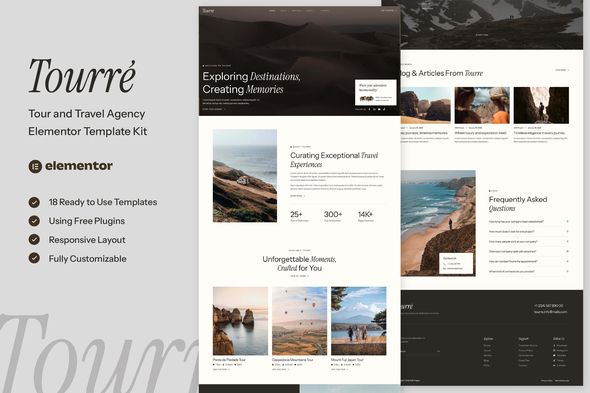
The immediate impression one gets from the Tourre kit is its clear intent: a clean, modern aesthetic tailored specifically for the travel sector. It's not attempting to reinvent the wheel, but rather to refine existing patterns into a cohesive package. From a design perspective, Tourre leans heavily into contemporary web design conventions. We see ample use of high-resolution imagery – critical for showcasing exotic destinations – paired with a relatively muted color palette that allows these visuals to dominate. The typography, generally sans-serif, is legible and consistent, contributing to an overall sense of professionalism. This isn't a kit that screams "trendy" but rather "reliable" and "established."
Visual Cohesion and User Experience
Examining the page templates provided, the kit maintains a strong visual consistency across different layouts. Headers and footers are well-defined, providing clear navigation and essential contact information without being overly intrusive. The use of white space is commendable; elements breathe, preventing visual clutter that can often plague content-heavy travel sites. On the user experience front, the layouts guide the eye effectively through calls to action, destination highlights, and booking inquiries. Elements like hero sections with prominent search forms, dedicated destination pages, tour detail pages, and testimonial blocks are all present, reflecting a sound understanding of what a travel agency website requires. However, the kit, by its nature, provides a baseline. Integrating a truly dynamic search and booking engine will almost certainly require third-party plugins and custom Elementor integrations, which adds complexity beyond the kit itself. The forms provided are standard Elementor forms, good for initial inquiries, but lack advanced booking functionality out-of-the-box.
Structural Integrity and Responsiveness
Under the hood, Elementor template kits operate by providing a collection of pre-designed sections and pages. Tourre’s structure leverages Elementor's container system (or older section/column model, depending on the kit's age and Elementor version it was built for, though newer kits favor containers). This generally translates to a predictable and manageable DOM structure. For responsive design, the kit generally performs well. Testing across standard breakpoints (mobile portrait, tablet, desktop) reveals thoughtful adaptations. Elements stack logically, images scale appropriately, and text remains readable. There are no glaring instances of overlapping content or truncated elements. However, like any Elementor-based site, fine-tuning for specific devices or edge-case resolutions will always fall to the implementer. The kit provides a solid foundation, but expecting pixel-perfect responsiveness without any manual adjustment is naive when dealing with dynamic content and varied user devices.
Functionality & Elementor Widget Usage
Tourre makes extensive use of core Elementor widgets and often includes reliance on Elementor Pro features. Expected elements such as image carousels, animated headlines, call-to-action buttons, accordion FAQs, and testimonial sliders are integrated. The kit also features dedicated sections for displaying tour packages, destination grids, and agent profiles. The effective use of Elementor's global styles and theme builder components (for header/footer) means that once imported, modifications to typography, colors, and site-wide elements can be done efficiently from a central location. This is a significant advantage over kits that rely solely on individual page edits. Critical components for a travel site, such as a prominent search bar for destinations or packages, are included in the hero sections, but their true functionality is often superficial without backend integration. Developers must be prepared to connect these front-end elements to a booking system, a custom post type archive, or a third-party API.
A point of gentle criticism here: while the visual elements are robust, the interactive components, beyond basic forms and sliders, are somewhat limited by the nature of a static template kit. Booking calendars, dynamic pricing, real-time availability checks, or complex filtering systems are entirely external concerns. The kit provides the interface, but not the engine. This is not a flaw of Tourre specifically, but a common characteristic of most Elementor template kits, which primarily focus on visual presentation. A senior developer would immediately recognize this and budget for the integration of dedicated booking plugins or custom solutions.
Performance Considerations
Performance is a constant battle in web development, especially with page builders. Tourre, by virtue of being an Elementor kit, inherits Elementor’s overhead. The kit employs several image-heavy sections, which, if not properly optimized post-import, can significantly impact page load times. Lazy loading is typically handled by WordPress or Elementor itself, but image dimensions and compression remain the responsibility of the content creator. Similarly, custom fonts, while aesthetically pleasing, can add to the page weight. Developers implementing Tourre must prioritize image optimization, consider a CDN, and leverage caching plugins aggressively. While the structural cleanliness helps, the reliance on numerous Elementor sections and potentially intricate styling can still lead to a larger DOM tree and increased CSS/JS payload than a hand-coded theme. A critical eye towards stripping out unused widgets and optimizing assets is essential for achieving respectable Core Web Vitals scores.
Deployment Strategy: Installing the Tourre Elementor Template Kit
Implementing an Elementor Template Kit like Tourre involves a series of structured steps, ensuring a smooth transition from a blank WordPress canvas to a fully realized travel agency website. This isn't just about uploading files; it's about configuring your environment and understanding the sequential process. Many acquire these kits from sources like gplpal, which often bundle them for convenient access.
Prerequisites: Laying the Groundwork
Before even thinking about importing the kit, ensure your WordPress environment is properly set up. Neglecting these foundational steps is a common source of frustration:
-
WordPress Installation: A fresh, clean WordPress installation is ideal. Ensure it's up-to-date (latest stable version).
-
Elementor (Free & Pro): The Tourre kit is explicitly designed for Elementor. You'll need the free Elementor plugin installed and activated. More importantly, nearly all professional-grade kits, including Tourre, leverage Elementor Pro features (Theme Builder, Custom CSS, Dynamic Content, Pro Widgets). Therefore, Elementor Pro is a near-mandatory installation.
-
Hosting Environment: This is often overlooked. Your hosting needs to meet WordPress and Elementor's minimum requirements:
-
PHP Version: 7.4 or higher (ideally 8.0+ for performance and security).
-
MySQL Version: 5.6 or higher, or MariaDB version 10.1 or higher.
-
WP Memory Limit: At least 256MB, preferably 512MB. You can usually increase this in your wp-config.php file (define('WP_MEMORY_LIMIT', '512M');) or via your host's control panel.
-
Max Execution Time: 300 seconds.
-
Max Input Vars: 2000.
These settings prevent timeouts and ensure large template imports complete successfully. -
Essential Plugins: While Tourre itself is a template kit, it relies on Elementor. You'll also need the "Elementor Template Kit Import" plugin from WordPress.org. This plugin is specifically designed to handle the .zip files containing the kit's global styles and individual templates.
Step-by-Step Installation & Configuration
- Download the Kit
Acquire the Tourre Elementor Template Kit from your chosen source. You'll typically receive a single .zip file. Do not unzip this file manually; it's designed to be uploaded as-is via the Elementor Template Kit Import plugin.
- Install Required Plugins
From your WordPress dashboard, navigate to Plugins > Add New.
-
Search for "Elementor" and install/activate the free plugin.
-
Upload and activate Elementor Pro (assuming you have a license).
-
Search for "Elementor Template Kit Import" and install/activate it. This plugin is crucial for importing the full kit package.
-
Upload and Activate the Template Kit
Once the "Elementor Template Kit Import" plugin is active, you'll find a new menu item under Elements > Installed Kits.
-
Click on Upload Template Kit Zip File.
-
Select the Tourre .zip file you downloaded and click Install Now.
-
The plugin will process the file. After a moment, you'll see the Tourre kit listed. Click on the Activate button next to it.
-
Import Global Styles and Individual Templates
With the kit activated, you'll be presented with an import interface. This is a critical juncture where you define the kit's foundation on your site.
-
Global Kit Styles: This is the first and most important item to import. Click Import Global Kit Styles. This will apply the kit’s fonts, colors, and site settings to your Elementor Global Styles. Confirm any prompts to overwrite existing global styles if this is a fresh install.
-
Theme Builder Parts (Header, Footer, Single Post, Archive, etc.): Next, import the Theme Builder templates. These include the site-wide header, footer, single post layouts, and archive page layouts. Navigate to Templates > Theme Builder after importing them to ensure they are assigned correctly. For example, assign the imported header to 'Entire Site'.
-
Individual Page Templates: Now, go through and import the individual page templates (Home, About, Services, Destinations, Contact, etc.). Do this one by one by clicking Import Template next to each. These will be imported into Templates > Saved Templates. They are not yet live pages on your site.
-
Create WordPress Pages from Templates
The imported templates are not automatically WordPress pages. You need to create them:
-
Go to Pages > Add New.
-
Give your page a title (e.g., "Home").
-
Click Edit with Elementor.
-
Inside the Elementor editor, click the folder icon to open the Template Library.
-
Navigate to the "My Templates" tab.
-
Find the imported Tourre homepage template and click Insert.
-
After the template loads, you may need to adjust the page layout settings (e.g., set to "Elementor Full Width" or "Elementor Canvas" depending on whether your theme provides a header/footer or if you're using the kit's theme builder header/footer).
-
Publish the page.
-
Repeat this process for all other essential pages (About Us, Services, Destinations, Contact, etc.).
-
Configure Menus
Once your pages are created, set up your navigation menu:
-
Go to Appearance > Menus.
-
Create a new menu.
-
Add your newly created pages to the menu.
-
If you imported a header via the Theme Builder, ensure its menu widget is configured to display this new menu.
-
Set Homepage
Finally, tell WordPress which page is your site's front page:
-
Go to Settings > Reading.
-
Under "Your homepage displays," select "A static page."
-
Choose your newly created "Home" page from the dropdown.
-
Save Changes.
Post-Installation Customization & Optimization
The kit is now installed, but the work isn't over. This is where the "senior developer" hat truly comes on:
-
Content Replacement: Swap out all dummy text and images with your client’s actual content. Pay close attention to image sizes and optimization.
-
Global Style Adjustments: Fine-tune the global colors and typography under Elementor > Site Settings to match branding guidelines precisely.
-
Form Configuration: Ensure all Elementor forms are properly configured to send submissions to the correct email addresses or integrate with CRM systems.
-
Third-Party Integrations: Integrate booking engines, map services, and any other specific travel agency functionalities. This often involves embedding shortcodes or custom Elementor widgets.
-
SEO Optimization: Install an SEO plugin (e.g., Rank Math, Yoast SEO) and configure meta titles, descriptions, and ensure proper heading structures. Elementor itself does a decent job with semantic HTML, but content-level optimization is manual.
-
Performance Tuning: Implement a robust caching strategy (e.g., WP Rocket, LiteSpeed Cache), optimize images further, and consider font loading optimization. Scrutinize the loaded assets and defer non-critical CSS/JS.
-
Accessibility Audit: Conduct a basic accessibility check. While Elementor does include some accessibility features, template kits don't always guarantee full compliance. Check contrast ratios, keyboard navigation, and ARIA attributes where applicable.
Real-World Utility and Developer Perspective
From a developer's standpoint, the Tourre kit represents a double-edged sword. On one hand, it provides a tremendous head start. For a freelance developer or a small agency tasked with delivering a travel agency website on a tight deadline, this kit shaves off countless hours of design and initial layout work. The visual appeal is there, and the structure is solid. It significantly reduces the "blank canvas" paralysis.
However, the trade-off is often flexibility and a certain degree of "kit bloat." While Tourre is well-structured, any Elementor kit brings with it the inherent characteristics of a page builder: more markup than a custom-coded theme, and a dependency on the Elementor ecosystem. For projects requiring extreme customization, unique functionalities that deviate significantly from the kit's core offerings, or absolute peak performance for high-traffic sites, a template kit can become more of a constraint than an enabler. It's akin to using a well-crafted prefab home – great for quick construction, but modifying major structural elements becomes complex and costly.
For small to medium-sized travel agencies or startups looking for a professional online presence without a massive budget for custom development, Tourre is a strong contender. It allows business owners to quickly visualize and launch their site, with subsequent iterations handled by a developer. For developers, it's a productivity multiplier for standard projects, freeing up time for more complex backend integrations or bespoke functionalities. The availability of such kits through repositories offering Free download WordPress themes and plugins democratizes access to high-quality design, but still demands a skilled hand for professional implementation and optimization.
Final Assessment: Tourre's Place in the Elementor Ecosystem
The Tourre Elementor Template Kit confidently occupies its niche as a reliable, visually appealing solution for travel and tour agencies. Its strengths lie in its modern design, responsive layouts, and the thoughtful inclusion of industry-specific sections. The structured approach to Elementor widget usage and global styling means that once imported, basic customization is straightforward for anyone familiar with Elementor's interface.
My critical assessment centers not on what the kit fails to do, but on what it inherently cannot do as a template kit: provide dynamic booking infrastructure, custom code solutions, or guarantee bleeding-edge performance without post-installation developer intervention. It is a robust shell, requiring content, integrations, and rigorous optimization to become a high-performing, revenue-generating machine. Developers should approach Tourre as an accelerated starting point, not a complete solution. Its value proposition is clear: reduce initial development time and design costs, allowing resources to be redirected towards content creation, marketing, and the essential custom functionalities that truly differentiate a travel business.
Ultimately, for a developer aiming to deliver a polished travel agency website efficiently, Tourre is a commendable tool in the arsenal. Just understand its boundaries and be prepared to build out its full potential.
评论 0