Crossword Game - HTML5, Construct3: A Deep Dive for Developers and Publishers - Download Free
Crossword Game - HTML5, Construct3: A Deep Dive for Developers and Publishers
The landscape of casual browser-based gaming has matured significantly, driven by the ubiquity of HTML5 and increasingly powerful game engines that abstract away much of the low-level complexity. Among these, Construct3 stands out as a formidable tool for rapid development, particularly for 2D games. We're taking a detailed look at a specific offering designed for this ecosystem: Crossword Game - HTML5,Construct3. This review, from the perspective of a senior web developer with a keen eye on technical implementation and real-world utility, will dissect its architecture, evaluate its practicality, and provide a comprehensive installation guide for those considering its integration into their projects.
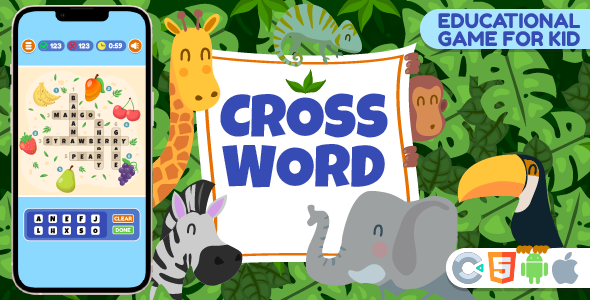
Technical Underpinnings: Construct3 and HTML5 Synergy
Developing a crossword game, while seemingly straightforward in concept, presents several interesting technical challenges. Grid generation, word placement algorithms, input validation, and user interface responsiveness all require careful implementation. The choice of Construct3 as the development platform for this particular game immediately tells us a few things about its likely strengths and potential limitations.
Construct3: A Developer's Perspective
Construct3 excels as an event-driven, visual development environment. For game types like crosswords, where the logic is often state-based (e.g., checking if a word is complete, validating input against a dictionary, managing score), this paradigm can be highly efficient. Developers often appreciate Construct3 for:
-
Rapid Prototyping: Ideas translate quickly into playable builds, allowing for agile iteration on game mechanics. This is invaluable for refining user experience in a puzzle game.
-
Visual Scripting: The event sheet system, while not traditional coding, offers a structured way to define game logic. For a crossword, this means setting up conditions for letter placement, word completion, and feedback mechanisms without writing thousands of lines of JavaScript.
-
HTML5 Export: Construct3's primary output is a highly optimized HTML5 application, making deployment to web servers, app stores (via wrappers), and various browsers seamless. This fits perfectly with the modern web.
-
Built-in Features: It handles common necessities like asset management, scene transitions, and basic UI elements, reducing the need for external libraries or custom code for these aspects.
However, the abstracted nature of Construct3 also introduces considerations for a senior developer:
-
Limited Code Access: While Construct3 supports JavaScript plugins and behaviors, direct manipulation of the underlying game loop or rendering pipeline is restricted. This can become a bottleneck for highly custom optimizations or complex, non-standard interactions.
-
Performance Overhead: While generally efficient, Construct3 projects can sometimes carry a larger footprint than a meticulously hand-coded HTML5 game, particularly if event sheets become overly complex or assets are not optimally managed. For a crossword, this is less of a concern than for an action-packed platformer, but still worth noting.
-
Engine Lock-in: The project files are proprietary. While the exported HTML5 is open, modifying the core game logic requires a Construct3 license and expertise. This impacts long-term maintainability and potential for external contribution if the original developer is unavailable.
HTML5: The Universal Canvas
The choice of HTML5 as the output format is, for a web-based game, almost a given in the current era. Its advantages are clear:
-
Cross-Platform Compatibility: A well-made HTML5 game runs on virtually any modern browser, desktop or mobile, without requiring plugins. This broadens the game's reach significantly.
-
Ease of Deployment: Hosting an HTML5 game is as simple as serving static files from any web server. Integration into existing websites is trivial, often just an iframe or a few lines of JavaScript.
-
Accessibility: HTML5 provides mechanisms for better accessibility (though often underutilized in game development), and its text-based nature makes content more discoverable.
Challenges with HTML5, particularly for games, include:
-
Performance Variability: Browser engines differ in their JavaScript and Canvas rendering performance. Optimizing for a consistent experience across all major browsers (Chrome, Firefox, Safari, Edge) requires careful testing.
-
Resource Loading: Managing asset loading, caching, and manifest files efficiently is crucial for a smooth user experience, especially on slower connections.
-
Security Concerns: While not a primary issue for a simple crossword, complex web games must be mindful of potential vulnerabilities, especially when integrating with external services or handling user data.
Game Mechanics and Implementation Review
A crossword game's core mechanics revolve around a grid, a word list, clues, and user input. From a technical standpoint, a robust implementation handles:
-
Grid Generation/Loading: Does the game dynamically generate grids, or load predefined layouts? A dynamic system is more flexible but technically demanding. Predefined layouts simplify development but might limit variety. Given Construct3's strengths, pre-defined or externally supplied word lists that populate a flexible grid are more probable and manageable.
-
Input Handling: How does the player enter letters? Is it character-by-character, or do they type full words? Does it support both keyboard and touch input seamlessly? The responsiveness of input fields and cursor management within the grid is critical for a good user experience.
-
Validation Logic: Real-time validation of individual letters and completed words against the correct answers is essential. This often involves comparing user input to a stored solution array.
-
Hint System: A well-implemented hint system (e.g., revealing a letter, showing an incorrect word) requires careful state management.
-
UI/UX Responsiveness: The game's interface must adapt to various screen sizes. Construct3 provides tools for responsive design, and how effectively these are utilized determines the game's mobile playability.
Without direct access to the Construct3 project files, we infer a few implementation patterns. Word lists and clue data are likely stored in arrays or dictionaries within Construct3's data structures (e.g., JSON files imported, or built-in arrays). The grid itself is typically an array of objects or sprites, each representing a cell, with properties for its letter, whether it's part of a word, and its current state (empty, correct, incorrect). Events would then handle key presses, mouse clicks, and touch events to update these cell states.
Performance for a crossword game typically isn't a major bottleneck. The number of sprites and events is generally low compared to other game genres. However, poorly optimized text rendering or excessive use of computationally intensive effects could potentially cause minor slowdowns on older devices.
Extensibility and Customization for Developers
For a product like "Crossword Game - HTML5,Construct3" sold for general use, extensibility is paramount. Developers want to adapt it to their brand, integrate it into larger platforms, and potentially add unique features. Here's what we look for:
-
Content Management: How easy is it to change word lists and clues? Ideally, this should be configurable via an external file (e.g., JSON, CSV) that the game loads. This allows content creators to update puzzles without needing Construct3.
-
Theming/Styling: Can colors, fonts, and UI elements be easily modified? In Construct3, this usually involves swapping out sprite assets or adjusting object properties. A well-organized project makes this a simple task.
-
Integration Points: Does the game expose events or methods that allow external JavaScript to interact with it? For example, could a developer hook into a "game completed" event to trigger a leaderboard submission, or pass new puzzle data from a database? While Construct3 offers some JS plugin capabilities, deeper integration often requires careful planning by the original author.
-
Monetization Hooks: If the intent is to monetize, are there clear areas to integrate ad SDKs (e.g., Google AdSense, AdMob via a wrapper) or in-app purchase mechanisms? For a pure HTML5 export, this typically involves embedding the game in an environment that handles these, or using Construct3's advertising plugins.
A "senior web developer" lens also questions the project's adherence to best practices. Are assets properly optimized (image dimensions, compression)? Is the event sheet well-commented and structured logically? This impacts not just initial customization but also long-term maintenance. A complex Construct3 project can quickly become spaghetti code if not managed meticulously.
Deployment and Integration Considerations
Once acquired and customized, deploying an HTML5 Construct3 game is generally straightforward. The exported package typically contains an index.html file, JavaScript files (the Construct3 runtime and game logic), and an assets folder. This package is essentially a self-contained web application.
-
Web Hosting: Any standard web server (Apache, Nginx, IIS) or cloud storage solution configured for static website hosting (e.g., AWS S3, Google Cloud Storage, Netlify) can serve the game files.
-
Embedding: The most common method for integrating into an existing website is using an <iframe>. This sandboxes the game, preventing conflicts with the parent page's scripts and styles. Alternatively, if the game is designed to be tightly integrated, its contents can be loaded directly into a <div> element, though this requires more careful management of CSS and JavaScript scopes.
-
Mobile Apps: For mobile app deployment, the HTML5 export can be wrapped using tools like Cordova, Capacitor, or Electron (for desktop apps), allowing it to be published to app stores.
Installation and Basic Customization Guide
This guide assumes you have purchased and downloaded the "Crossword Game - HTML5,Construct3" package. While specific file names and directory structures might vary slightly, the general process remains consistent.
Prerequisites:
-
A modern web browser (Chrome, Firefox, Safari, Edge).
-
A text editor (VS Code, Sublime Text, Notepad++).
-
For web deployment: Access to a web server (FTP client, cPanel, or command-line access).
-
(Optional, for deep customization) A Construct3 license and basic familiarity with the Construct3 editor.
Step 1: Download and Unpack the Game Files
-
After purchasing, you will receive a ZIP archive. Download this file to your computer.
-
Unzip the archive. You should find a directory containing several files and subdirectories. Typically, this includes:
-
index.html (the main entry point for the game)
-
c2runtime.js or c3runtime.js (the Construct runtime)
-
data.js or similar (game logic/data)
-
images/ (game sprites, textures)
-
media/ (audio files)
-
icons/ (favicon, app icons)
-
Potentially, a project.c3p file if the Construct3 source is included.
Step 2: Local Testing (Verify Functionality)
Before deploying to a live server, always test the game locally.
-
Navigate into the unzipped directory.
-
Locate the index.html file.
-
For a simple local test, you can often just double-click index.html to open it in your default browser. This works for many Construct3 exports.
-
However, some browsers (due to security policies like CORS) might restrict local file access for certain game features (e.g., loading external data files). For a more robust local test, it's recommended to use a simple local web server.
-
Using a local web server (Recommended):
-
Python: If you have Python installed, open your terminal/command prompt, navigate to the game's root directory, and run: python -m http.server 8000. Then open your browser and go to http://localhost:8000.
-
Node.js (http-server): If you have Node.js, install http-server globally: npm install -g http-server. Then, in the game's root directory, run: http-server -p 8000. Access via http://localhost:8000.
-
VS Code Live Server: If using VS Code, install the "Live Server" extension. Right-click on index.html and select "Open with Live Server".
-
Play through a few puzzles to ensure everything functions as expected. Check input, scoring, and UI responsiveness.
Step 3: Deploying to a Web Server
Once you've confirmed local functionality, it's time to upload the game to your web server.
-
Choose Your Destination: Decide where the game will reside on your server. This could be a subdomain (e.g., games.yourdomain.com), a subfolder (e.g., yourdomain.com/games/crossword/), or the root of a specific website.
-
Upload Files:
-
FTP Client (FileZilla, Cyberduck): Connect to your web server using your FTP credentials. Navigate to your desired directory on the server. Drag and drop all the files and folders from your unzipped game directory to this location. Ensure all subdirectories (images/, media/, etc.) are uploaded correctly.
-
cPanel File Manager: Log into your cPanel, find "File Manager," and navigate to the target directory (e.g., public_html/games/). Use the "Upload" feature to upload the zipped game file, then extract it directly on the server. Alternatively, upload individual files and folders.
-
Command Line (SCP/SFTP): If you have SSH access, use tools like scp -r /local/path/to/game/files user@yourserver:/remote/path/.
-
Verify Deployment: Open your web browser and navigate to the URL where you uploaded the game (e.g., http://yourdomain.com/games/crossword/index.html or just http://yourdomain.com/games/crossword/ if your server is configured to serve index.html by default).
Step 4: Basic Customization (Without Construct3 Source)
Even without the Construct3 source file (.c3p), you can often perform basic customizations by editing the exported HTML and associated data files.
-
Modifying Game Title/Description: Open index.html in your text editor. You can usually change the <title> tag content and potentially meta tags to reflect your game's name and description.
-
Favicon/App Icons: Replace the images in the icons/ directory with your own custom icons. Ensure they match the specified dimensions in index.html.
-
Changing Word Lists/Clues: This is the most common customization. Look for a file named something like data.js, words.json, or a script block within index.html that defines the game's puzzles. This will likely be an array of objects, where each object represents a puzzle or a word and its clue. // Example structure (may vary) var puzzles = [ { "grid": [ ["C", "A", "T", ""], ["", "", "O", ""], ["D", "O", "G", ""] ], "words": [ {"word": "CAT", "clue": "A common house pet."}, {"word": "DOG", "clue": "Man's best friend."}, {"word": "GO", "clue": "To move."} ] }, // ... more puzzles ];
Carefully edit this structure, ensuring JSON syntax is correct if it's a JSON file. Test locally after every change.
- Basic Styling (if exposed): Sometimes, core colors or fonts are defined directly in index.html via inline styles or a small <style> block. Minor adjustments might be possible there. For deeper visual changes, the Construct3 source is usually required.
Step 5: Embedding in an Existing Website
To integrate the game into your existing website (e.g., a WordPress page, a custom HTML page), the safest and most common method is using an <iframe>.
-
First, ensure the game is deployed and accessible on your web server (from Step 3). Get its full URL (e.g., https://yourdomain.com/games/crossword/).
-
In your website's HTML, add the following code: <iframe src="https://yourdomain.com/games/crossword/" width="800" height="600" frameborder="0" scrolling="no" allowfullscreen></iframe>
-
Adjust src: Replace the example URL with the actual URL of your deployed game.
-
Adjust width and height: Set these to match the optimal dimensions of the game, or make them responsive using CSS for a better experience on various devices. You might need to experiment to find the best fit.
-
frameborder="0": Removes the default border around the iframe.
-
scrolling="no": Prevents scrollbars if the game fits within the iframe dimensions.
-
allowfullscreen: Enables the game to go into full-screen mode if it supports it.
Troubleshooting Common Issues:
-
Game not loading:
-
Check your browser's developer console (F12). Look for JavaScript errors or network errors (404 Not Found for assets).
-
Ensure all files and folders were uploaded correctly to your server, maintaining the correct directory structure.
-
Verify file permissions on your server. They should be readable by the web server (often 644 for files, 755 for directories).
-
Assets (images, audio) missing:
-
Double-check paths within data.js or similar files, and ensure the asset files themselves are in the correct subdirectories (e.g., images/, media/).
-
CORS issues: If loading assets from a different domain or experiencing issues with local testing, your browser's security policy might be blocking resources. A local web server (as described in Step 2) usually resolves this.
-
Game not responsive in iframe:
-
Ensure the game itself is designed to be responsive within Construct3.
-
Use CSS to make the iframe itself responsive. A common technique: .iframe-container { position: relative; width: 100%; padding-bottom: 75%; / Aspect ratio (e.g., 4:3, so 3/4 = 0.75 * 100%) / height: 0; overflow: hidden; } .iframe-container iframe { position: absolute; top: 0; left: 0; width: 100%; height: 100%; } Then wrap your iframe: <div class="iframe-container"> <iframe src="..." frameborder="0" allowfullscreen></iframe> </div>
Critical Assessment and Recommendations
The "Crossword Game - HTML5,Construct3" package occupies a specific niche. For an individual or small team needing a functional, deployable crossword game quickly, it presents a compelling solution. The Construct3 foundation means rapid content creation and deployment for those familiar with the engine.
However, for a senior web developer eyeing integration into a large-scale application or a highly custom platform, the "black box" nature of a Construct3 export without direct source code access is a significant limitation. While the game's exported HTML5 and JavaScript are open, modifying core behaviors, optimizing low-level performance, or adding complex integrations often demands the original Construct3 project file. The availability of this source (.c3p) in the package greatly enhances its value, enabling full customization and future-proofing.
Areas for potential improvement, beyond what's typically found in a generic template, include:
-
Advanced Puzzle Generation: A more sophisticated algorithm for generating crosswords on the fly, perhaps with difficulty levels, would elevate the game from a fixed-puzzle experience to a dynamic one.
-
Localization Support: Tools or clear methods for translating clues and game UI into multiple languages.
-
Backend Integration: While possible with external JS, built-in hooks for leaderboards, user authentication, or server-side puzzle loading would add significant value for publishers.
-
Accessibility Features: Enhanced keyboard navigation, screen reader compatibility, and color contrast options are increasingly important for wider audience reach.
Ultimately, this product is well-suited for developers seeking a robust starting point for a crossword game. Its HTML5 and Construct3 roots ensure broad compatibility and ease of deployment. The key to maximizing its value lies in understanding its inherent design constraints and leveraging its strengths for rapid integration and content delivery. For those exploring options from gplpal, this game represents a solid example of what pre-built Construct3 templates can offer, and the site also offers various resources, including Free download WordPress themes and plugins, catering to a wide range of web development needs.
评论 0