FiMobile Technical Review: A Three-Headed Hydra for Modern FinTech Apps - Activated
FiMobile Technical Review: A Three-Headed Hydra for Modern FinTech Apps
In the world of web templates, ambition is a double-edged sword. It can lead to a versatile, feature-rich product, or it can result in a sprawling, unfocused mess. The FiMobile Finance HTML Template Bootstrap 5 Framework7 Angular 12 Starter boldly presents itself as a multi-headed solution for FinTech front-ends, bundling three distinct technology stacks under one name. It promises the stability of Bootstrap 5, the native-feel of Framework7, and the enterprise-readiness of an Angular 12 starter kit. As a developer who has seen countless "all-in-one" solutions fall flat, my immediate reaction is skepticism. Is this a cohesive development suite or just three different templates zipped together? We're going to tear it down, inspect the code, and determine if this package is a powerful accelerator or an architectural dead end.
First Impressions: Unpacking the Digital Crate
Upon unzipping the FiMobile package, the tripartite nature of the product is immediately apparent. The root directory is clean, presenting three primary folders that correspond to the advertised stacks, plus a documentation folder:
-
HTML_Bootstrap/
-
HTML_Framework7/
-
Angular_12_Starter/
-
Documentation/
This separation is both a good and a bad sign. It’s good because it means the technology stacks are not dangerously intertwined in some proprietary, hard-to-maintain build system. You can pick your preferred stack and discard the rest without fear of breaking dependencies. It's potentially bad because it hints that these might be three entirely separate projects with a shared design system, which could lead to inconsistencies and a duplicated maintenance effort. The documentation is a standard affair—a well-formatted HTML file that serves as a basic guide to the features and file structures. It’s adequate, but it won’t hold your hand through complex integrations.
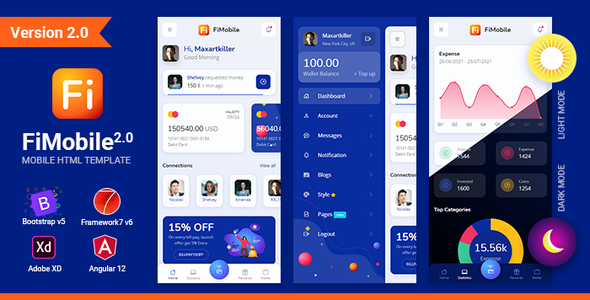
Before diving into each stack, it’s worth noting the overall design language. FiMobile presents a clean, modern, and slightly playful FinTech aesthetic. It uses a vibrant color palette, clear typography, and data visualizations (charts, graphs) that are central to any financial application. The UI feels competent and trustworthy, which is a critical baseline for this sector. Now, let's see how this design holds up under the hood of each implementation.
Part 1: The Bootstrap 5 Version – The Dependable Workhorse
The Bootstrap 5 version is exactly what you’d expect: a collection of static HTML, CSS, and JavaScript files. This is the path of least resistance for many projects, especially those with a traditional backend (like PHP, Ruby on Rails, or Django) that will render the HTML server-side.
Setup and Deployment
Getting this version running is trivial. You don't need a complex build process. Any simple local web server will do the trick. For developers, a quick command in the terminal is all it takes:
python3 -m http.server
Or, you can use a tool like the Live Server extension in Visual Studio Code. This simplicity is its greatest strength. You can hand these static files over to a backend developer, and they can start integrating them into their templating engine of choice without needing to become a front-end build expert.
Code Quality and Structure
Digging into the HTML_Bootstrap/ folder, the structure is logical. There’s a root directory with all the primary HTML pages (index.html, login.html, transactions.html, etc.) and an assets/ directory containing the CSS, JS, images, and vendor libraries.
HTML: The markup is clean and utilizes Bootstrap 5’s grid system and utility classes extensively. It's a double-edged sword. While this makes prototyping and layout changes incredibly fast, it can lead to "div-itis" and bloated HTML that mixes structural concerns with presentation. I found the use of ARIA (Accessible Rich Internet Applications) attributes to be present but minimal. For a production-grade financial application, a thorough accessibility audit and enhancement would be a mandatory first step.
CSS: The project uses SASS, which is a huge plus. The files are broken down logically in assets/scss/, with a main file that imports variables, mixins, and component-specific styles. The developers have correctly customized Bootstrap by overriding SASS variables rather than writing a massive override stylesheet. This makes theme-wide changes (like adjusting the primary color or default font size) a simple one-line edit. This is a sign of professional front-end architecture.
JavaScript: The JS is a mix of vanilla JavaScript and dependencies like ApexCharts for data visualization and Swiper.js for carousels. Crucially, there is no jQuery dependency, which aligns with the modern Bootstrap 5 ethos. The custom JavaScript code resides in assets/js/main.js. It's functional but largely procedural. It initializes the plugins and handles minor UI interactions. For a simple site, this is fine. For a complex, stateful application, this file would quickly become an unmanageable monolith. This implementation is clearly not designed to be a Single Page Application (SPA).
Verdict on the Bootstrap Version
This is a solid, reliable, and professionally structured static template. It’s perfect for projects where the front-end is primarily for presentation, driven by a powerful backend. Its main weakness is its lack of inherent state management, which is a core requirement for any truly interactive financial dashboard. It’s an excellent starting point for an MVP or a team that wants to use a familiar, dependable stack.
Part 2: The Framework7 Version – The Mobile-First Specialist
Framework7 (F7) is a more opinionated choice than Bootstrap. It is explicitly designed to replicate the look, feel, and behavior of native iOS and Android applications in a web view. This makes it an ideal candidate for Progressive Web Apps (PWAs) or for being packaged inside a native wrapper like Cordova or Capacitor.
Setup and Feel
Like the Bootstrap version, the F7 implementation is primarily static files that can be served easily. However, its purpose is fundamentally different. Opening the F7 index.html reveals an interface that feels less like a website and more like an application shell. It uses a tab bar for primary navigation, page transitions slide in from the side, and components like modals and action sheets mimic their native counterparts.
The user experience is where F7 shines. On a mobile device, the interactions are smooth and responsive. The FiMobile design adapts well to this paradigm, with cards, lists, and forms all feeling touch-friendly and appropriately scaled. The developers have correctly leveraged F7's built-in router for handling page navigation within the single-page shell, which is a core tenet of the framework.
Code and Architecture
The F7 architecture is more prescribed. You initialize a new F7 app in your main JavaScript file and define your views and routes. The FiMobile template follows this pattern correctly:
var app = new Framework7({ root: '#app', name: 'FiMobile', id: 'com.fimobile.test', routes: routes, ... });
The code is structured around F7's page-based component system. Each page has its own HTML file (e.g., pages/dashboard.html) and can have an associated "page init" event in the JavaScript to handle its specific logic. This provides better code organization than the single monolithic JS file in the Bootstrap version. It forces you into a more modular way of thinking.
However, like the Bootstrap version, it lacks a robust state management solution out of the box. F7 has a simple built-in Store, but for a complex FinTech app, you’d likely want to integrate a more powerful library or methodology for handling application-wide state (like user authentication, account balances, etc.).
Verdict on the Framework7 Version
This version is the specialist. If your primary goal is to build a PWA or a hybrid mobile app that feels native, this is the clear winner. It’s more complex to customize than the Bootstrap version if you’re unfamiliar with F7's conventions, but the UX payoff for mobile users is immense. Choosing this path means committing to a mobile-first, app-like experience. It would be a poor choice for a traditional, content-heavy website.
Part 3: The Angular 12 Starter – The Enterprise Contender
This is the most ambitious and complex part of the package. An Angular starter kit promises more than just UI components; it promises a scalable, maintainable architecture for a full-blown web application. The choice of Angular 12 is a bit dated—as of late 2023, Angular is well into version 17. This is an immediate concern. While Angular 12 is an LTS (Long-Term Support) version, any new project should seriously consider starting with the latest release to avoid accumulating technical debt from day one. Many developers looking for a quick start on a site like gplpal might not be aware of these versioning nuances.
Installation and Setup Guide
Unlike the static HTML versions, this is a full-fledged Node.js project that requires the Angular CLI. The setup process is standard for any Angular developer but could be a hurdle for newcomers.
Prerequisites:
-
Node.js (v14.15 or v16.10 recommended for Angular 12)
-
Angular CLI v12.x (npm install -g @angular/cli@12)
Installation Steps:
-
Navigate to Directory: Open your terminal and navigate into the Angular_12_Starter/ folder.
-
Install Dependencies: Run the command npm install. This will download all the required packages defined in package.json. Expect a few warnings about optional peer dependencies, which is common.
-
Run the Development Server: Execute ng serve. This command compiles the application and starts a local development server, typically at http://localhost:4200/. The server supports hot-reloading, so changes to your code will automatically refresh the browser.
-
Build for Production: When you're ready to deploy, run ng build. This command creates a highly optimized build of your application in the dist/ folder. These are the static files you would deploy to your web server.
Architectural Deep Dive
This is where we separate a simple theme from a true application starter. A quick inspection of the src/app/ directory reveals a promising structure.
Module Structure: The application is broken down into feature modules (e.g., DashboardModule, AuthModule), which is a core best practice for scalable Angular architecture. Routes are lazy-loaded, meaning the code for a specific feature is only downloaded when the user navigates to it. This is excellent for initial application load time.
Componentization: The components are well-defined and follow Angular conventions. They've correctly used the Bootstrap 5 styling by importing the SASS files into the main styles.scss file in the Angular project. This means the UI is consistent with the static Bootstrap version, but it's now powered by reusable, data-bound components.
Services and Data: The template includes services for fetching data. However, these are just stubs. They return mock, hardcoded JSON data. This is expected in a starter kit, but it's important to understand the work involved. Your first major task will be to rip out this mock data and replace it with real HTTP calls to your backend API. The services are correctly set up to be injectable, so swapping out the implementation will be straightforward.
State Management: There is no explicit state management library like NgRx or Akita included. State is handled simply via Angular services, which is fine for small-to-medium applications. For a complex FinTech dashboard with multiple interdependent data streams, a dedicated state management solution would be a wise addition.
Verdict on the Angular Starter
This is a legitimate application starter, not just a ported theme. The architecture is sound, following established Angular best practices like lazy-loading and a modular structure. The biggest drawback is the version number. Starting a new project on Angular 12 today is questionable. The upgrade path to Angular 17 is feasible but will require some work. This starter is best for a team that is either mandated to use this specific version or has the expertise to perform the upgrade immediately. It delivers on its promise of providing a solid architectural foundation, saving dozens of hours of setup time.
Final Verdict: A Versatile Toolkit with Caveats
FiMobile is not a single product; it's a development kit that caters to three different project types. This is its core strength and its primary weakness. The design is clean and appropriate for the FinTech space, and the code quality within each individual stack is generally high.
The Good: You get three well-executed starting points for one price. Whether you need a quick static site, a native-feeling PWA, or a full-blown enterprise SPA, there's a version here for you. The use of SASS and modern JavaScript practices (no jQuery) is commendable.
The Questionable: The Angular 12 version is a significant sticking point. It's a solid foundation, but it's already several major versions behind. This is a critical factor that potential buyers must weigh. While some may browse collections of Free download WordPress themes for quick projects, a starter kit like this implies a longer-term investment where the starting version matters.
The Reality: The maintenance of three separate codebases means that inconsistencies could creep in over time. When a new chart or UI element is designed, will it be implemented perfectly across all three versions in future updates? It’s a significant challenge.
FiMobile succeeds in its ambition by keeping the stacks cleanly separated. It avoids the trap of creating a monstrous, over-engineered hybrid. Instead, it offers you a clear choice. Your job as a developer is to understand the trade-offs of each path and pick the one that aligns with your project's long-term goals. It's a powerful and valuable toolkit, provided you walk in with your eyes open, especially concerning the Angular version.
Scorecard
-
Design & Aesthetics: 9/10
-
Bootstrap Code Quality: 9/10
-
Framework7 Implementation: 8/10
-
Angular Architecture: 7/10 (High quality, but the outdated version is a major penalty)
-
Documentation: 7/10
-
Value for Money: 8/10
评论 0