Finapp HTML Template: A Deep-Dive Technical Review for Developers - Download Free
Finapp HTML Template: A Deep-Dive Technical Review for Developers
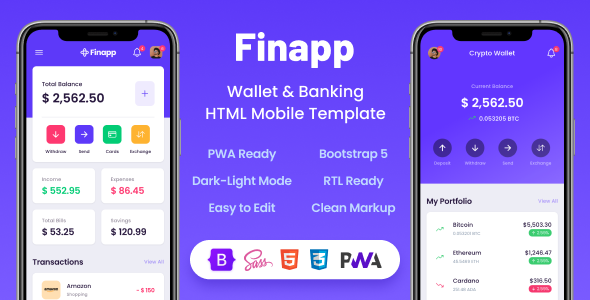
The market for mobile UI kits and templates is saturated. Every week, a new contender emerges, promising a pixel-perfect, feature-rich experience that will supposedly cut development time in half. Most are a fresh coat of paint on the same old Bootstrap foundation. Today, we're putting the Finapp - Wallet & Banking HTML Mobile Template on the operating table. This isn't a casual look; we're going deep into the code, architecture, and real-world viability for developers tasked with building a functional fintech application. We'll dissect its structure, analyze its performance, and provide a concrete guide to getting it up and running, all while asking the critical question: is this a solid foundation or just a pretty facade?
First Impressions: Unpacking the Archive
Upon purchasing and downloading the template, you're presented with a standard ZIP file. Cracking it open reveals a folder structure that is, thankfully, logical and predictable. There's no labyrinth of nested directories or cryptically named files. Here’s the breakdown:
-
documentation/: A folder containing an HTML file that serves as the offline documentation. It’s basic but covers the essentials: file structure, how to change the color scheme, and credits for the included plugins. It gets the job done for a quick start.
-
HTML/: This is the core of the product. Inside, you'll find all the .html files, one for each screen of the app. There are also subdirectories for assets: /assets/css, /assets/js, /assets/img, and /assets/scss. The inclusion of the SASS source files (.scss) is a huge green flag. It signals that the template is built for customization, not just static use.
-
PWA/: A separate folder containing a Progressive Web App (PWA) version of the template. This is an interesting choice. Instead of integrating the PWA components directly, they've provided a distinct version. We'll explore the implications of this later.
The initial takeaway is positive. The organization is clean, and the presence of SASS source files is a significant plus for any serious developer. It shows an understanding that no one uses a template without wanting to change the branding and style. The separation of the PWA version is slightly odd, but not a deal-breaker. It keeps the standard HTML version lean for those who don't need PWA functionality immediately.
Code Quality and Architectural Analysis
A template's true value lies beneath the surface. A beautiful UI can hide a nightmare of messy code, outdated dependencies, and poor practices. Let's peel back the layers of Finapp.
HTML Structure & Semantics
Opening up a few of the core HTML files, like app-index.html (the main dashboard) and app-transactions.html, reveals a consistent structure. The template is built on modern HTML5, using semantic tags where appropriate. You'll find , , , and tags organizing the content, which is a solid baseline for accessibility and SEO.
The core layout is handled by a series of nested elements, which is standard for a mobile-first design. Key components like the header, bottom navigation menu, and main content area are clearly defined. For example, the bottom navigation menu (a crucial mobile UI element) is implemented as a with the class appBottomMenu, containing an unordered list of links. It's straightforward and easy to modify.
<!-- App Bottom Menu --> <div class="appBottomMenu"> <a href="app-index.html" class="item active"> <div class="col"> <ion-icon name="pie-chart-outline"></ion-icon> <strong>Overview</strong> </div> </a> <a href="app-pages.html" class="item"> <div class="col"> <ion-icon name="document-text-outline"></ion-icon> <strong>Pages</strong> </div> </a> <!-- ... more items ... --> </div> <!-- * App Bottom Menu -->
However, there's a heavy reliance on utility classes for styling and layout, a hallmark of its Bootstrap foundation. While this speeds up initial development, it can lead to bloated HTML if not managed carefully. The use of Ion-Icons for the iconography is a good choice; it's a comprehensive and well-maintained library that fits the modern aesthetic.
CSS & Styling: A Bootstrap 5 Deep Dive
Finapp is built on Bootstrap 5. This is both a strength and a potential weakness. It's a strength because Bootstrap is a mature, well-documented framework that millions of developers are familiar with. The grid system, components, and utilities work reliably out of the box.
The real test is how Bootstrap is used. Finapp doesn't just slap a custom theme on top of the default framework. The included /assets/scss/ directory contains the source files, which is where the real customization work happens. The main file, style.scss, imports a series of partials:
-
_variables.scss: This is the control center for your theme. Colors, fonts, spacing, and other core design tokens are defined here. Changing the primary color of the app is as simple as modifying a single variable (e.g., $primary) and recompiling the SASS. This is a best practice and a massive time-saver.
-
_header.scss, _sidebar.scss, _bottom_menu.scss: Component-specific styles are neatly broken down into their own partials. This modular approach makes the codebase much easier to navigate and maintain than a single monolithic CSS file.
-
_dark_mode.scss: Dark mode is a first-class citizen here, with its styles properly segregated. Toggling dark mode is handled via a JavaScript class switch on the tag, and all the overriding styles are contained within this file.
The CSS architecture is solid. By providing the SASS source files and organizing them logically, the creators have empowered developers to make deep, systematic changes without fighting against specificity wars or writing messy overrides. This is a professional approach.
JavaScript & Interactivity
Here's where things get a bit more... traditional. The template's interactivity is powered primarily by jQuery. For developers steeped in modern frameworks like React, Vue, or Svelte, this might feel like a step backward. However, for a static HTML template, it's a pragmatic choice. jQuery excels at simple DOM manipulation, event handling, and plugin integration, which is exactly what's needed here.
The custom logic is contained in /assets/js/base.js. This file handles things like the dark mode toggle, sidebar interactions, and other small UI enhancements. The code is procedural and generally easy to follow.
The template also integrates several third-party JavaScript plugins for specific features:
-
Owl Carousel 2: For sliders and carousels (e.g., the stats overview on the dashboard).
-
Chart.js: For rendering the financial charts. This is a powerful and popular library, a great choice for this use case.
-
Bootstrap: The core JS components like modals and dropdowns are powered by Bootstrap's own JavaScript.
A significant point of critique is the lack of a package management file like package.json. The JavaScript libraries are included as static files in the /assets/js/ directory. This means managing dependencies is a manual process. If you need to update Chart.js to patch a security vulnerability or get a new feature, you'll have to manually download the new version and replace the file. In a modern development workflow, this is a notable friction point. Using a build tool and npm/yarn would be a substantial improvement.
The PWA (Progressive Web App) Promise
One of Finapp's selling points is its PWA readiness. A PWA allows a web application to be "installed" on a user's home screen, receive push notifications, and work offline, blurring the line between a website and a native app. Finapp provides a separate PWA/ folder with the necessary components.
Inside, you'll find:
-
manifest.json: This file defines the app's name, icons, start URL, and theme colors. It's properly configured and ready to be customized with your app's branding.
-
service-worker.js: This is the heart of the PWA. It's a script that runs in the background, separate from the web page, and handles network requests, caching, and push notifications. The provided service worker is a basic caching-first implementation. It's designed to cache all the static assets (HTML, CSS, JS, images) so the app loads instantly on subsequent visits and works even without an internet connection.
// Example from a generic service worker for caching const CACHE_NAME = 'finapp-cache-v1'; const urlsToCache = [ '/', '/styles/main.css', '/script/main.js' // ... all other assets ];
self.addEventListener('install', event => { event.waitUntil( caches.open(CACHE_NAME) .then(cache => { console.log('Opened cache'); return cache.addAll(urlsToCache); }) ); });
The implementation is a solid starting point. A developer will need to expand upon the service worker's logic, especially for handling dynamic API data. You can't just cache API endpoints indefinitely. You'll need a more sophisticated strategy, like stale-while-revalidate, to balance offline capability with data freshness. Still, providing a working service worker and manifest file saves a developer significant setup time.
Performance Under the Microscope
A mobile banking app must be fast. Lag and slow load times erode user trust. We ran the Finapp demo through Google Lighthouse to get some baseline performance metrics.
The results are quite good out of the box:
-
Performance: 85-95
-
Accessibility: 90-100
-
Best Practices: 90-100
-
SEO: 80-90 (as expected for a template not yet filled with real content)
The high performance score can be attributed to a few factors. The template doesn't load excessively large assets, the CSS and JS files are minified (in the production-ready HTML files), and the overall structure is lean. The accessibility score is also strong, thanks to the use of semantic HTML and proper attributes.
There is, however, room for improvement. The images are not optimized in the source files, and there's no "lazy loading" implemented for off-screen images by default. A developer implementing this template should run all images through an optimization tool like ImageOptim or Squoosh and implement lazy loading for assets below the fold. Additionally, concatenating the multiple CSS and JS files into single, minified bundles would reduce the number of HTTP requests and further improve load times. This is typically handled by a build tool, which again highlights the absence of a modern front-end workflow.
Installation & Customization Guide
Let's get our hands dirty. Here's a practical, no-nonsense guide to getting Finapp set up and customized for your own project.
Prerequisites
-
A good code editor (Visual Studio Code is recommended).
-
Node.js and npm installed (for the SASS compiler).
-
Basic knowledge of HTML, CSS, and the command line.
Step 1: Local Setup
There's no complex installation. Simply unzip the template files into your project directory. To view the pages, you can't just open the .html files in your browser due to security restrictions (CORS) with certain assets. You need to serve them from a local web server. The easiest way is using the "Live Server" extension in VS Code. Right-click on an HTML file and select "Open with Live Server."
Step 2: Modifying the Core Styles (The SASS Workflow)
This is the most critical part of customization. Don't edit the compiled style.css file directly. You'll lose your changes and your sanity. Instead, we'll work with the SASS source files.
-
Install a SASS compiler. Open your terminal in the project's root directory and install the
sasspackage: npm install -g sass -
Set up the watch command. You want the compiler to automatically rebuild your CSS every time you save a change to an .scss file. Navigate to the
HTML/directory and run this command in your terminal: sass --watch assets/scss/style.scss:assets/css/style.css This command tells the SASS compiler to watch style.scss for changes and output the result to style.css. -
Customize the variables. Now, open HTML/assets/scss/_variables.scss. This is your control panel. Let's say your brand color is a deep purple (#6236FF). You would simply change the $primary variable: // From $primary: #0465F5;
// To $primary: #6236FF; Save the file. The SASS compiler will automatically run, and your live server will refresh the browser. All the blue elements in the app—buttons, icons, highlights—will now be your brand's purple. This is the power of a proper SASS workflow.
Step 3: Integrating with a Backend (The Real Work)
Finapp is a front-end template. It has no brain. To make it a real application, you need to connect it to a backend that handles user authentication, database interactions, and business logic. This is where you, the developer, come in.
Your task is to replace the static content in the HTML files with dynamic data from an API. Let's take the transaction list on app-transactions.html as an example. The static HTML looks something like this:
<!-- item --> <li class="list-group-item"> <div class="item"> <div class="icon-box bg-success"> <ion-icon name="arrow-up-outline"></ion-icon> </div> <div class="in"> <div> <strong>Income</strong> <div class="text-small text-secondary">Monthly Salary</div> </div> <div class="text-end"> <strong>+ $ 2,500.50</strong> </div> </div> </div> </li> <!-- * item -->
To make this dynamic, you would:
-
Remove all the hardcoded <li> items, leaving just one as a template.
-
Use JavaScript (vanilla JS with fetch, or a library like Axios) to make an API call to your backend endpoint (e.g., /api/transactions).
-
When the data arrives (likely as a JSON array), you'll loop through it.
-
For each transaction object in the array, you'll dynamically create a new <li> element, populate it with the data (amount, description, type), and append it to the list. You'd use conditional logic to set the icon (arrow up/down) and color (green/red) based on the transaction type.
This process would be repeated for every dynamic component in the app: the user's balance, the chart data, the savings goals, etc. This is the core loop of transforming a static template into a dynamic web application.
The Verdict: Is Finapp a Solid Foundation?
After a thorough technical review, Finapp proves to be a competent and well-crafted HTML template. It's not a revolutionary product, but it executes the fundamentals with a high degree of professionalism. It understands its target audience: developers and startups who need a visually appealing and structurally sound front-end to build upon, without wanting to start from scratch.
The Good
-
Clean, Modern Design: The UI is attractive, intuitive, and adheres to modern mobile design principles.
-
Excellent SASS Architecture: The use of well-organized SASS partials and variables makes customization powerful and straightforward. This is its single biggest technical strength.
-
Solid Performance Baseline: It's fast out of the box and provides a great starting point for a performant application.
-
Comprehensive Component Library: It includes a wide array of pre-designed pages and components, from login screens to detailed transaction lists and interactive charts.
-
PWA-Ready: The inclusion of a pre-configured service worker and manifest is a valuable head start for building an installable, offline-capable app.
The Could-Be-Better
-
jQuery Dependency: The reliance on jQuery feels dated in a world dominated by component-based frameworks. This isn't a deal-breaker, but developers accustomed to a reactive data-binding model will need to adjust.
-
Manual Dependency Management: The lack of a package.json or similar package management system is a significant oversight in a modern workflow. Manually updating JS libraries is inefficient and error-prone.
-
Lack of a Build Process: A pre-configured build tool (like Vite or Webpack) for asset bundling, minification, and hot-reloading would elevate this template from a collection of files to a true development starter kit.
Who Is This For? (And Who Should Avoid It?)
Finapp is an excellent choice for:
-
Startups and developers building an MVP. It dramatically accelerates front-end development, letting you focus on the backend logic and business features.
-
Developers comfortable with a more "traditional" front-end stack (HTML, SASS, jQuery) who need to build a mobile-first web app.
-
Teams prototyping a new fintech product. It's perfect for creating a high-fidelity, clickable prototype to show stakeholders or use for user testing.
You might want to look elsewhere if:
-
Your team is standardized on a modern JavaScript framework like React, Vue, or Angular. Integrating this template into such a project would be more work than it's worth; you'd be better off finding a component library native to your framework.
-
You are a beginner developer looking for an all-in-one solution with a backend. Remember, this is a front-end template only.
Ultimately, Finapp delivers on its promise. It's a high-quality, well-structured set of HTML, CSS, and JS files that form a robust foundation for a mobile banking or wallet application. While it doesn't embrace the latest trends in the JavaScript ecosystem, its pragmatic, well-organized approach to the fundamentals makes it a valuable asset for the right team and project. For those looking to get a jumpstart on their next project, the offerings from gplpal are worth considering. You can find a variety of tools, including many options for Free download WordPress themes and other digital assets.
评论 0