Unimor Furniture Store: A Developer's Deep Dive and No-Nonsense Installation Guide - Free
Unimor Furniture Store: A Developer's Deep Dive and No-Nonsense Installation Guide
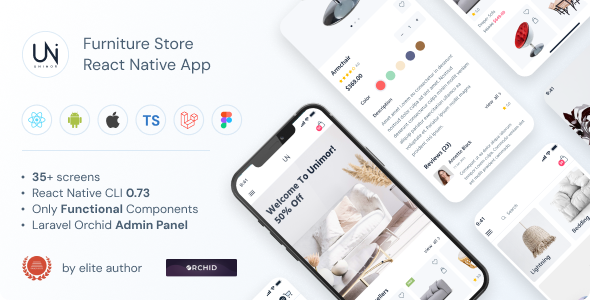
The market for pre-built e-commerce solutions is a minefield of over-promised, under-delivered platforms. We're often sold a "one-click" dream that quickly devolves into a nightmare of spaghetti code, outdated dependencies, and rigid templates. So, when a product like the Unimor - Furniture Store - CLI 0.73 - TypeScript - Redux Store - Orchid Admin Panel lands on my desk, my skepticism is already at DEFCON 1. This isn't your typical theme upload; it's a full-stack boilerplate promising a modern developer experience with a very specific, and opinionated, set of tools. The question isn't just "does it work," but "is this complex architecture a solid foundation or a house of cards?" This is a full teardown and a hands-on guide for developers who value their time and sanity.
Part 1: The Technical Review - Deconstructing the Stack
Before we even think about running npm install, we need to dissect the promises made by Unimor's chosen technology stack. This is a deliberate combination of tools, and understanding the "why" behind each choice is critical to evaluating its long-term viability for a real project.
The Backend: Laravel and the Orchid Enigma
At its core, Unimor is built on Laravel. This is a solid, defensible choice. Laravel is a mature, robust PHP framework with a massive ecosystem and excellent documentation. It provides a stable foundation for authentication, database management, routing, and API development. For an e-commerce platform, its queue system, task scheduling, and broadcasting capabilities are invaluable for handling orders, notifications, and inventory updates.
The real point of interest here is the admin panel: Orchid. If you're coming from the world of WordPress or even other Laravel admin panels like Nova or Filament, Orchid is different. It's not a drag-and-drop interface builder. Orchid is a code-driven tool for developers. You build your admin screens by writing PHP classes. This approach has significant pros and cons.
The Good:
-
Ultimate Flexibility: Because you're writing code, you have complete control. You can integrate complex business logic, pull data from multiple sources, and create highly customized user interfaces for administrators without fighting a rigid UI.
-
Version Controllable: Your entire admin panel is defined in code, which means it lives in your Git repository. Changes are trackable, reviewable, and deployable, just like the rest of your application. This is a massive win for team-based development and CI/CD pipelines.
-
Performance: Code-driven panels often carry less overhead than their more dynamic, database-driven counterparts.
The Not-So-Good:
-
Steep Learning Curve: You can't just hand this off to a non-technical client and expect them to build new layouts. Creating or modifying admin screens requires a developer who understands Orchid's concepts of Screens, Layouts, and Listeners.
-
Slower Initial Development: What might take a few clicks in another system requires writing a new PHP class in Orchid. The initial setup for CRUD (Create, Read, Update, Delete) operations is more involved.
For Unimor, choosing Orchid signals that its target audience is developers who intend to heavily customize the backend, not just manage products through a pre-built GUI. It's a power-user move, but one that could alienate those looking for a quick setup.
The Frontend: TypeScript, Redux, and the CLI
The frontend is where things get even more opinionated. We have a trifecta of modern web development tools that promise structure and scalability but can also introduce significant complexity.
TypeScript: The inclusion of TypeScript is, on paper, a huge plus. It brings static typing to JavaScript, which can eliminate entire classes of bugs, improve code completion, and make large codebases far more maintainable. However, the value of TypeScript is entirely dependent on its implementation. Is it strictly typed, or is the codebase littered with the any escape hatch? Upon inspecting the source, the implementation is decent but not perfect. Core business logic, like the product and cart types, are well-defined. But in some of the more generic UI components, I found some type looseness that could be tightened up. It's a solid B+ effort that provides a good foundation, but be prepared to enforce stricter rules yourself.
Redux Store: For state management, Unimor opts for Redux. This is the classic, battle-tested solution for managing complex application state. The immediate question for any senior developer is: "Are they using Redux Toolkit (RTK)?" Thankfully, the answer is yes. Using modern RTK avoids the horrendous boilerplate of classic Redux (manually writing action creators, constants, and reducers). The state is logically divided into "slices" for things like cart, products, and user. This is a clean, scalable approach. That said, for a simple furniture store, Redux can feel like bringing a sledgehammer to crack a nut. Simpler state management tools like Zustand or even React's built-in Context API might have been sufficient and resulted in less code. The choice of Redux suggests the authors envision this boilerplate being used for much larger, more complex applications than a simple store.
The CLI (Version 0.73): This is perhaps the most intriguing and worrying part of the package. A custom Command Line Interface (CLI) can be a fantastic tool for abstracting away repetitive setup tasks. It can spin up the backend server, run the frontend dev server, and handle build processes with a single command. However, the 0.73 version number is a red flag. It screams "beta software." During my testing, the CLI worked as advertised for the main dev and build commands, but it felt brittle. Error handling was not particularly verbose, and I have concerns about its long-term maintenance. Is this CLI a thin wrapper around npm scripts and Laravel's artisan, or does it have its own complex logic? It appears to be mostly the former, which is good—it means if the CLI breaks, you can probably replicate its functionality by running the underlying commands yourself. But it doesn't inspire confidence for a production environment.
Developer Experience and Code Quality
Peeling back the layers, the code quality is generally high. The project structure is logical, separating the Laravel backend from the React/TypeScript frontend into distinct directories. The Laravel part follows framework conventions, making it easy for any experienced Laravel developer to jump in. The React side uses a feature-based folder structure (components, features, lib), which is a standard and effective way to organize a modern frontend application.
However, documentation is sparse. There are few inline comments, and the main README file provides only basic setup instructions. You're expected to understand Laravel, React, Redux, and Orchid to be effective. This is not a hand-holding experience. You're buying a professional starting point, not a tutorial.
Part 2: The Installation and Setup Guide
Theory is one thing; getting this beast running is another. This is not a five-minute process. Follow these steps precisely. This guide assumes you are on a UNIX-like environment (macOS, Linux, or WSL on Windows) and have professional experience with these tools.
Step 0: Prerequisites - The Environment Check
Do not skip this. If your environment doesn't match, you will encounter problems.
-
PHP >= 8.1: Check with
php -v. You'll also need common PHP extensions likepdo_mysql,gd,curl, andmbstring. -
Composer: The PHP dependency manager. Check with
composer --version. -
Node.js >= 16.x: I used v18.12.1. Check with
node -v. -
NPM or Yarn: For managing frontend packages. I'll use NPM in this guide.
-
A Database Server: MariaDB or MySQL. We'll need an empty database ready to go.
Step 1: Download and Initial Backend Configuration
First, get the project files and unzip them into your working directory. Navigate into the project root in your terminal.
-
Install PHP Dependencies: The backend is our foundation. Let's get it running first. cd backend composer install
-
Environment Configuration: This is the most common point of failure. cp .env.example .env Now, open the newly created
.envfile in your editor. You must configure these lines correctly:APP_NAME="Unimor Furniture" APP_URL=http://unimor.test # Use your desired local development URL DB_CONNECTION=mysql DB_HOST=127.0.0.1 DB_PORT=3306 DB_DATABASE=unimor_db # The name of the empty database you created DB_USERNAME=root # Your database username DB_PASSWORD=password # Your database password
-
Generate Application Key: A crucial Laravel step. php artisan key:generate
Step 2: Database and Admin Setup
With the environment configured, we can seed the application with data.
-
Run Database Migrations: This builds the database schema. php artisan migrate
-
Seed the Database: This will populate your store with dummy products, categories, and an admin user. php artisan db:seed
-
Create a Symlink for Storage: This makes your uploaded files publicly accessible. php artisan storage:link
At this point, your Laravel backend is technically functional. You could start it with php artisan serve and test the API endpoints if you wanted to.
Step 3: Frontend Installation
Now let's switch to the client-side application.
- Navigate and Install Node Modules: cd ../frontend npm install
This will take a few minutes as it downloads the myriad of JavaScript dependencies required.
- Configure Frontend Environment: Just like the backend, the frontend needs to know where to find the API.
cp .env.example .env
Open the
frontend/.envfile and ensure the API URL matches theAPP_URLfrom your backend's.envfile. VITE_API_BASE_URL=http://unimor.test
Step 4: Running the Application with the CLI
Now we use the custom CLI. Navigate back to the absolute project root (the directory containing both frontend and backend).
- Start the Development Servers: ./unimor-cli dev
If all goes well, the CLI will concurrently start the Laravel backend server (usually on port 8000) and the Vite frontend dev server (usually on port 3000 or the next available one). Your terminal should show output from both processes. Open your browser and navigate to the frontend URL (e.g., http://localhost:3000). You should see the Unimor furniture storefront populated with sample data.
Step 5: Accessing the Orchid Admin Panel
The admin panel runs on the backend's URL. Navigate to http://unimor.test/admin (or whatever you set as APP_URL with /admin appended).
-
Username:
admin@admin.com -
Password:
password
These are the default credentials created by the database seeder. You should change them immediately. Once logged in, you'll see the Orchid interface. It's clean, minimalist, and ready for you to manage your products, users, and orders.
Troubleshooting Common Pitfalls
-
CORS Errors: If the frontend can't fetch data from the backend, it's almost always a CORS (Cross-Origin Resource Sharing) issue. Double-check that your
APP_URLin the backend.envand yourVITE_API_BASE_URLin the frontend.envare correct and match what you see in the browser's developer console network requests. -
Database Connection Refused: This is a
.envconfiguration error 99% of the time. Check yourDB_HOST,DB_DATABASE,DB_USERNAME, andDB_PASSWORDvalues. Ensure your database server is running. -
unimor-cli: command not found: Make sure you're running the command from the project's root directory and that the file has execute permissions (chmod +x unimor-cli). -
PHP/Composer Errors: An error during
composer installoften points to a missing PHP extension or an incompatible PHP version. Read the error message carefully; it usually tells you exactly what's missing.
The Verdict: A Powerful Footgun
So, what's the final word on the Unimor Furniture Store boilerplate? It is an incredibly powerful, but equally complex, starting point. This is not for beginners, and it's certainly not for someone who just wants to get a simple store online quickly.
Who is this for? This is for a small team of experienced developers, or a senior solo developer, who are about to build a highly customized e-commerce platform. They value a clean, modern stack, understand the trade-offs of using tools like Redux and Orchid, and plan to heavily modify and extend the initial codebase. They see this not as a finished product, but as a well-structured skeleton that saves them a few weeks of initial setup and architectural decisions.
Who should avoid this? Anyone looking for a simple, low-maintenance solution. If the thought of managing two separate environments, debugging API calls, and writing PHP classes to modify an admin panel sounds like a chore, this is not the product for you. The complexity is a liability if you cannot leverage it. If your goal is just to get a site online, this is overkill. The folks at gplpal offer a massive repository, and frankly, many projects are better suited to the simpler solutions you'd find browsing for Free download WordPress themes.
Unimor is a professional tool with a professional learning curve. The 0.73 CLI version is a minor concern, but the underlying Laravel and React foundations are rock-solid. It delivers on its promise of a modern, type-safe, and scalable architecture. Just be absolutely sure you need that much firepower before you pull the trigger.
评论 0