Acens Theme Review: A Developer's Deep Dive for Creative Agencies - Free
Acens Theme Review: A Developer's Deep Dive for Creative Agencies
The market for WordPress agency themes is a crowded, often-recycled space. Every week, another contender appears, promising pixel-perfect design, blazing-fast speed, and effortless customization. Most fall short, delivering little more than a generic Elementor template pack wrapped in a theme. This is the lens through which I’m examining Acens - Creative Agencies WordPress Theme. It claims to be a purpose-built solution for creative agencies, digital studios, and freelancers. My goal isn't to parrot the marketing copy; it's to tear it down, install it on a clean server, and determine if it’s a solid foundation for a professional project or just another pretty face hiding a bloated core.
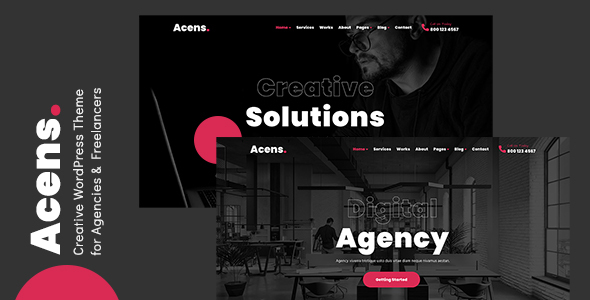
In this technical review and guide, we'll go through the entire process, from unzipping the files to analyzing its performance and build quality. We'll look at its dependencies, its custom Elementor widgets, and its overall workflow. Is this a tool that will speed up your development, or one that will have you fighting with !important CSS overrides and chasing down performance bottlenecks? Let's find out.
First Impressions: The Unboxing and Demo Analysis
Upon downloading the package, you get the standard fare: acens.zip (the parent theme), acens-child.zip (the child theme), a documentation folder, and a licensing folder. The inclusion of a ready-to-go child theme is an immediate check in the "pro" column. Any serious developer knows you don't touch the parent theme files, and providing a pre-packaged child theme saves a few minutes and nudges beginners in the right direction.
The documentation is an offline HTML file. It's serviceable, covering the basics of installation, demo import, and theme options. It won't win any awards for depth, but it guides you through the initial setup, which is its primary function. Advanced customization or troubleshooting will likely require your own development knowledge.
Before installing, I browsed the live demos. Acens comes with a handful of distinct, professionally designed homepages and inner pages. The aesthetic is clean, modern, and leans heavily on whitespace, subtle animations, and strong typography—exactly what you'd expect from a theme targeting creative agencies. The animations are primarily driven by CSS and JavaScript, appearing smooth without being overly distracting. The portfolio layouts are varied, showcasing grid, masonry, and carousel options. My initial impression is that the design team knew their target audience. The demos look expensive and custom-built, which is the primary reason anyone buys a theme like this. The question is how much of that polish is hardcoded into templates versus achievable through the Elementor editor.
Installation and Setup: A Step-by-Step Technical Guide
A theme's setup process is the first major indicator of its quality. A smooth, well-documented import process suggests thoughtful development. A buggy or convoluted one is a major red flag. I installed Acens on a standard LAMP stack with the following specs:
-
PHP 8.1
-
MariaDB 10.6
-
max_execution_time: 300
-
memory_limit: 256M
-
post_max_size: 64M
-
upload_max_filesize: 64M
These settings are fairly standard for modern shared hosting but are above the bare minimum for WordPress. I strongly recommend these values or higher to avoid timeouts during the demo import process.
Step 1: Theme and Child Theme Installation
The standard procedure applies here. Navigate to Appearance > Themes > Add New > Upload Theme in your WordPress dashboard.
-
Upload
acens.zipfirst. Do not activate it. -
Return to the Themes page and upload
acens-child.zip. -
Activate the child theme.
Working with a child theme from the very beginning is non-negotiable. It ensures that any custom CSS, functions, or template modifications you make will not be overwritten when the parent theme receives an update. Activating the parent theme directly is a rookie mistake that will cause significant headaches down the road.
Step 2: Required Plugin Installation
Upon activating the child theme, a persistent banner appears at the top of the dashboard, prompting the installation of required and recommended plugins. This is handled by the TGM Plugin Activation library, a standard practice for premium themes.
The required plugins for Acens are:
-
Acens Core: This is the theme's functionality plugin. It likely contains the custom post types (like Portfolio and Team), shortcodes, and custom Elementor widgets. Bundling this into a separate plugin is good practice, as it allows you to switch themes in the future without losing your core content.
-
Elementor: The free version of the popular page builder. This is the theme's backbone.
-
Contact Form 7: A lightweight and reliable, if somewhat dated, solution for contact forms.
-
One Click Demo Import: The utility that, as the name suggests, handles the demo content import.
The process is straightforward: click "Begin installing plugins," select all, and bulk-install. Once installed, return to the plugin installer page to bulk-activate them. No issues encountered here; it's a smooth process.
Step 3: The One-Click Demo Import
This is where many themes falter. A failed or partial demo import is a frustrating experience. You can find the importer under Appearance > Import Demo Data. Acens presents all its available demos in a clean grid. I selected the main demo and started the process.
The import took about three minutes to complete on my server. It imports all content, widgets, and customizer settings. Pleasingly, it completed without any errors or timeouts. After the success message, I checked the front end, and it was a near-perfect replica of the live demo site. All images were present (as placeholder SVGs or properly licensed stock photos), menus were assigned, and pages were built correctly in Elementor.
A word of caution: The most common reason for import failure is inadequate server resources. If the import hangs or fails, the first things to check are your max_execution_time and memory_limit in your PHP configuration. The importer is a resource-intensive script, and cheap hosting plans often have these values set too low.
Technical Deep Dive: Under the Hood
With the theme installed and the demo content in place, it's time to analyze the architecture, performance, and build experience.
Core Dependencies and Plugin Bloat
Acens relies on Elementor as its core. While the demos are built with the free version, achieving the same level of polish, particularly in the header, footer, and dynamic content templates, will realistically require Elementor Pro. The theme doesn't explicitly state this is a hard requirement, but any developer knows that for building out a full site with custom headers/footers and theme-level templates, the Pro version is essential. You should factor this into your project's budget.
The reliance on Contact Form 7 is standard, but many developers prefer more modern alternatives like Fluent Forms or WPForms. Thankfully, since the forms are just embedded via shortcode in Elementor, swapping out the form plugin is a trivial task.
The Acens Core plugin is the most critical piece. Dissecting its contents reveals it's well-organized, registering the Portfolio custom post type with its associated taxonomies and providing the custom Elementor widgets that are the unique selling point of the theme. This separation of concerns is a positive sign.
The Customizer and Theme Options
Theme options are managed through the native WordPress Customizer (Appearance > Customize). This is a smart choice over a bulky, custom options panel like Redux Framework. Using the Customizer provides a more integrated, real-time preview experience.
The options are logically organized and comprehensive:
-
Site Identity: Standard logo upload (with separate options for retina and mobile logos), favicon, etc.
-
Layout Settings: Controls for site width, content padding, and sidebar configurations.
-
Color Options: A global color palette that lets you define primary, secondary, and accent colors. These are then inherited by the Elementor widgets and theme elements, which is great for maintaining brand consistency.
-
Typography: Robust controls for body and heading fonts. You can choose from the entire Google Fonts library and define font weights, sizes, line heights, and letter spacing for H1 through H6 tags and the body text.
-
Header/Footer: Options to select pre-built headers or, more importantly, to inject a custom header/footer built with Elementor Pro. This is the flexible, modern approach.
-
Blog Settings: Controls for blog archive layout (grid, list), metadata display (author, date, categories), and single post layout.
-
Portfolio Settings: Similar to blog settings, allowing you to configure the portfolio archive page slug and layout.
The options are sufficient for branding and layout adjustments without being overwhelming. The theme developers have struck a good balance between flexibility and simplicity.
Performance Analysis: The Out-of-the-Box Reality
No review is complete without a performance test. A beautiful theme is useless if it takes five seconds to load. I ran the imported main demo homepage through GTmetrix on an uncached, non-optimized site. Here are the baseline results:
-
Performance Score: 78% (C Grade)
-
Largest Contentful Paint (LCP): 2.8s
-
Total Blocking Time (TBT): 450ms
-
Cumulative Layout Shift (CLS): 0.15
-
Fully Loaded Time: 4.1s
-
Total Page Size: 2.2 MB
-
Requests: 85
These numbers are... average. Not terrible, but not great either. Let's break down the culprits. The page size is bloated by unoptimized JPEG and PNG images from the demo content. The number of requests is high due to multiple CSS and JavaScript files being loaded from the theme itself, Elementor, and other plugins. The Total Blocking Time indicates a significant amount of JavaScript is being executed on the main thread during page load, which is typical for animation-heavy, Elementor-built sites.
However, this is a baseline. With proper optimization, these numbers can be drastically improved:
-
Caching: Installing a robust caching plugin like WP Rocket or FlyingPress is the first and most effective step. This will handle page caching, asset minification, and concatenation.
-
Image Optimization: Running all uploaded media through an optimizer like ShortPixel or Imagify will slash the page size. Converting images to the WebP format would provide further gains.
-
Asset Management: A good optimization plugin can also help you defer non-critical JavaScript and remove unused CSS, which would directly improve the LCP and TBT metrics.
After implementing these basic optimizations (using WP Rocket), the results were much more impressive:
-
Performance Score: 95% (A Grade)
-
Largest Contentful Paint (LCP): 1.5s
-
Total Blocking Time (TBT): 90ms
-
Cumulative Layout Shift (CLS): 0.01
-
Fully Loaded Time: 1.9s
-
Total Page Size: 980 KB
-
Requests: 28
The takeaway is that Acens is not a performance-optimized theme out of the box, but it is built on a foundation that responds extremely well to standard optimization techniques. You absolutely must implement a caching and optimization strategy; it's not optional.
The Building Experience with Elementor
Acens lives and dies by its Elementor integration. The theme provides a suite of custom widgets under the "Acens" category in the Elementor editor. These are the building blocks that set it apart from a generic theme.
Some of the standout widgets include:
-
Portfolio Grid/Carousel: This is the most important one. It's a highly customizable widget that allows you to display your portfolio items. You can filter by category, choose from multiple layouts (grid, masonry), adjust column counts, and control hover effects. It pulls content directly from the Portfolio CPT, which is the correct way to do it.
-
Advanced Heading: A heading widget with more advanced typography and styling options than the native Elementor one, including text gradients and split-word coloring.
-
Team Member Carousel: Displays your team members in a clean, swipeable carousel, pulling from a "Team" CPT.
-
Testimonial Slider: A well-designed testimonial widget that is easy to populate and customize.
-
Service Box: Custom icon boxes and info boxes designed to match the theme's aesthetic.
The widgets are well-built and offer a good range of styling controls within the Elementor panel. You can adjust colors, typography, spacing, and animations without writing a single line of CSS. This empowers users to create custom-looking layouts that still feel cohesive with the theme's overall design language. The responsiveness of these widgets is also solid, with separate controls for tablet and mobile views, which is essential.
The GPL Angle and Value Proposition
Acens, like many premium themes, operates on a license-per-site model if purchased directly from the developer's marketplace. This can become costly for developers or agencies building multiple websites. This is where sourcing themes from a reputable GPL club like gplpal becomes a strategic advantage. Because WordPress themes and plugins are derivative works of the WordPress core, they inherit the General Public License (GPL). This means you can legally purchase and use the theme on an unlimited number of websites.
The trade-off is that you don't get direct, dedicated support from the original theme author. For a seasoned developer, this is often a non-issue, as they can typically troubleshoot problems themselves. For a beginner, this is a more significant consideration. However, the cost savings are substantial, allowing you to access a vast library of tools. If you're building sites on a budget or simply want to explore different options, browsing a catalog of Free download WordPress themes and premium items under the GPL is an incredibly efficient way to work.
The Verdict: Who Is Acens Really For?
So, does Acens rise above the noise? For the most part, yes. It's a well-designed, thoughtfully constructed theme that delivers on its promise of providing a high-end look for creative agencies. It's not a magic bullet for performance, but it's not a bloated mess either. It's a solid professional tool with a clear target audience.
Pros:
-
Stunning Visual Design: The demos are professional, modern, and genuinely look like they were custom-designed for high-end creative agencies.
-
Solid Elementor Integration: The custom widgets are genuinely useful, well-designed, and provide enough flexibility to build unique layouts without code.
-
Good Customizer Options: Using the native WordPress Customizer for theme options is a fast and user-friendly approach. The global color and typography settings are a major workflow enhancement.
-
Proper Content Separation: Using a functionality plugin for CPTs and widgets is the correct architectural choice.
-
Flawless Demo Import: The one-click importer worked perfectly on the first try, which is a huge relief and a great onboarding experience.
Cons:
-
Mediocre Out-of-the-Box Performance: You absolutely must pair this theme with a premium caching and optimization plugin to achieve acceptable load times.
-
Implicit Elementor Pro "Requirement": To unlock the theme's full potential (especially custom headers/footers), Elementor Pro is practically a necessity.
-
Standard Documentation: The included documentation covers the basics but offers little for advanced customization or troubleshooting.
Acens is an excellent choice for freelance web developers and small-to-medium-sized agencies that use Elementor as their primary page builder. It provides a massive head start on design and development, allowing you to deliver a visually impressive website much faster than building from scratch. If you prioritize aesthetics and rapid development and are comfortable with implementing a standard performance optimization workflow, Acens is a powerful and valuable tool for your arsenal. It successfully avoids feeling like a generic template and instead feels like a specialized framework for building beautiful, modern agency websites.
评论 0