Estatic Elementor Kit: A Developer's Hands-On Review and Guide - Download
Estatic Elementor Kit: A Developer's Hands-On Review and Guide
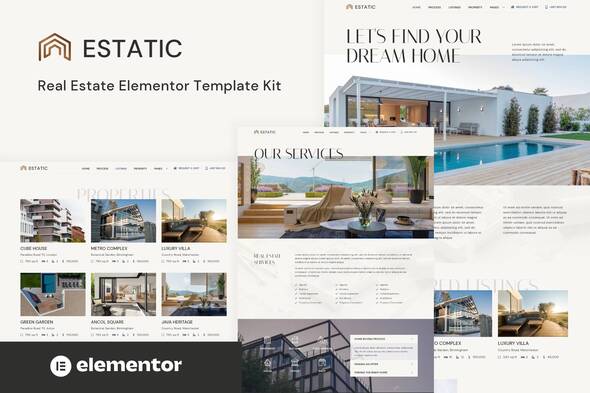
The promise of a "website in a box" is a powerful lure, especially in a competitive field like real estate where a strong digital presence is non-negotiable. The market is flooded with themes and page builders all claiming to be the one-click solution. Today, we're tearing down one of these offerings: the Estatic - Real Estate Elementor Template Kit. This isn't a surface-level overview. We're going to install it, dissect its structure, analyze its performance potential, and determine who this kit is actually for—and who should steer clear. This is a real-world test, not a sales pitch.
First, Let's Define Our Terms: What Exactly is a "Template Kit"?
This is the most critical point of understanding, and where many users go wrong. A Template Kit is not a WordPress theme. Let that sink in. It does not control your site's core functionality, headers, footers, or PHP files. Think of it less like the architectural blueprint of your house and more like a professional interior design package.
A template kit is a collection of pre-designed page and section layouts built exclusively for the Elementor page builder. You import these templates and apply them to individual pages. The core structure of your site is still governed by your active theme (a lightweight one like Hello Elementor, Astra, or GeneratePress is highly recommended). The kit provides the visual layer, the "look and feel," for your content.
This distinction is vital. If you're expecting a full-fledged real estate management system with IDX/MLS integration and agent profiles out of the box, you're looking at the wrong product. This kit provides the beautiful, client-facing storefront; you still need to supply the inventory management system in the back.
The Target Audience: Who Benefits from Estatic?
After working with the kit, I've identified a few key profiles that would find value here:
-
The DIY Real Estate Agent: An agent or small brokerage with a solid grasp of WordPress basics who wants a high-end look without hiring a designer. They understand they'll need a separate plugin for listings but want control over their marketing pages.
-
Freelance Web Developers: This is a major audience. For developers building sites for real estate clients, this kit is a massive accelerator. It provides a professional, client-approved design foundation, allowing the developer to focus on the more complex backend integration and customization. It shaves days, not hours, off a project.
-
Marketing Agencies: Agencies tasked with building landing pages or microsites for property developments can use these templates to rapidly deploy visually consistent and effective campaigns.
Who is it not for? If you're a complete WordPress novice who has never used a page builder, the learning curve might be frustrating. Additionally, if you need a deeply integrated, all-in-one system with a proprietary backend, a dedicated real estate theme or platform might be a better, albeit more restrictive, choice.
Part 1: The Installation and Setup Guide
Let's get our hands dirty. Theory is great, but execution is what matters. Here’s the no-fluff guide to getting the Estatic kit up and running on a clean WordPress installation.
Prerequisites: The Essential Toolkit
Before you even download the kit, ensure your environment is ready. You will fail without these pieces in place.
-
A Clean WordPress Install: I can't stress this enough. Don't try to bolt this onto a five-year-old website with 30 active plugins. Start fresh for the best results.
-
A Lightweight Theme: As mentioned, you need a theme. The "Hello Elementor" theme is the official, bare-bones choice designed for this exact purpose. It provides a blank canvas.
-
Elementor (Free Version): The core page builder plugin is a requirement. You can install it directly from the WordPress repository.
-
Elementor Pro (Highly Recommended): While some templates might work with the free version, the real power of a kit like this is unlocked with Elementor Pro. Features like the Theme Builder, which allows you to create dynamic templates for your property listings, headers, and footers, are essential for a real site. The Estatic kit is clearly designed with Pro in mind.
-
Template Kit Import Plugin: You need a tool to import the kit. The "Template Kit - Import" plugin by Envato is the standard and works well. Install and activate it.
Step-by-Step Import Process
Follow these steps precisely. Skipping one will lead to a broken layout.
Step 1: Download and Unpack the Kit
After purchasing, you'll receive a ZIP file. Do not upload this main ZIP file to WordPress. Unzip it on your computer first. Inside, you'll find the documentation, licensing, and another ZIP file which is the actual template kit (e.g., estatic-elementor-kit.zip). This is the file you'll import.
Step 2: Use the Importer Tool
In your WordPress dashboard, navigate to Tools > Template Kit. You'll see an upload area. Drag the correct kit ZIP file (estatic-elementor-kit.zip) into this area. The importer will process the file and display all the included templates.

Step 3: Import Global Kit Styles
Before you import any individual templates, look for the "Global Kit Styles" item at the top of the list. Click the "Import" button next to it. This is the most crucial step for design consistency. This single action imports the predefined color palette, typography settings (font sizes, families, weights for H1, H2, body text, etc.), and global layout settings. If you skip this, every template you import will inherit your theme's default styles, and it will look like a broken mess.
Step 4: Import The Core Templates
You'll see a list of all the templates: Homepage, About Us, Properties, Single Property Layout, Contact, etc. You can import them one-by-one or look for a button to import all of them. I recommend importing them all at once. The importer may warn you that it needs certain plugins (like Elementor Pro). Ensure these are installed and active before proceeding.
Step 5: Create Your Pages and Apply Templates
The templates are now in your Elementor library, but they aren't live on your site yet. You need to assign them.
-
Go to Pages > Add New.
-
Give your page a title, for example, "Home".
-
Under "Page Attributes," select the "Elementor Full Width" template. This removes the theme's default sidebar and title, giving Elementor full control of the canvas.
-
Click the "Edit with Elementor" button.
-
On the blank Elementor canvas, look for the grey folder icon to open the template library.
-
Click on the "My Templates" tab. You will see all the Estatic templates you just imported.
-
Find the "Home" template and click "Insert".
Repeat this process for all your key pages (About, Contact, etc.). Once you've created them, go to Settings > Reading and set your newly created "Home" page as the static homepage for your site.
Part 2: The Technical Review
With the site set up, it's time to put on the critic's hat. A pretty design is one thing; a functional, performant, and flexible website is another entirely.
Design and User Experience (UX) Analysis
The aesthetic of the Estatic kit is undeniably modern and clean. It leans towards a high-end, luxury market with its generous use of white space, crisp typography, and large, immersive imagery. This is a significant pro; it looks professional right out of the box.
Visual Cohesion: Excellent. Thanks to the Global Kit Styles, all the templates share a consistent design language. Buttons, forms, headings, and spacing are uniform across pages. This creates a trustworthy and polished user experience.
Responsiveness: I tested the templates on various breakpoints, from a 4K monitor down to a small mobile device. The results are solid, but not perfect. On desktop and standard mobile views, the layouts adapt beautifully. However, on some specific tablet sizes (around the 800-1000px width range), I noticed some container padding felt a bit tight and certain grid layouts could have benefited from an earlier collapse to a single column. This is a minor nitpick, as these are easily adjustable within Elementor, but it's not a "perfect on all devices" scenario without a few tweaks.
User Flow: The page structure is logical for a real estate business. The flow from the homepage (featuring properties) to a property archive page, then to a single property detail page, and finally to a contact/agent page is intuitive. The calls-to-action are clear and well-placed.
Code, Performance, and The Bloat Question
This is where my senior developer sensibilities kick in. Elementor can be a performance hog if used improperly. The sin of "div-ception"—nesting sections within columns within sections unnecessarily—can cripple a site's load time by creating a bloated Document Object Model (DOM).
I inspected the structure of the Estatic templates. The build quality is generally good. The designers seem to have a decent understanding of container hierarchy. They use Elementor's newer container and grid features where appropriate, which is a big plus for performance and flexibility over the old section/column model. However, I did find a few instances where an inner section could have been avoided by applying styles to a parent container. A developer could optimize this further, but for an off-the-shelf product, it's better than many I've seen.
A stock installation with this kit won't win any Core Web Vitals awards without optimization. The design relies heavily on high-resolution images, which is standard for real estate. Your responsibility will be to:
-
Aggressively Optimize Images: Use a plugin like ShortPixel or Imagify to compress all images and serve them in next-gen formats like WebP.
-
Implement Caching: A good caching plugin (e.g., WP Rocket, FlyingPress) is not optional, it's mandatory.
-
Minimize Plugins: Only use the plugins you absolutely need. Every active plugin adds overhead.
Customization and The Reality of Dynamic Data
This is the most important section of this review. The "Single Property" template looks great, but it's completely static. It's filled with placeholder text and images. How do you make it show your actual property listings?
This is where the kit stops and your work as a developer (or savvy DIYer) begins. You need a plugin to manage your property listings. The Estatic plugin itself is an option, but you could also use others like Toolset, ACF Pro, or a dedicated real estate plugin. The process generally looks like this:
-
Install a Listings Plugin: This plugin will create a Custom Post Type (e.g., "Properties") where you can add listings with custom fields like price, bedrooms, bathrooms, square footage, etc.
-
Use Elementor Pro's Theme Builder: You will create a new "Single Post" template in the Theme Builder. Instead of inserting the static Estatic template, you will rebuild its style using dynamic tags.
-
Mapping Dynamic Tags: For the heading, you'll use the "Post Title" dynamic tag. For the price, you'll use a dynamic tag that pulls from your "Price" custom field. The image gallery will be populated from the post's gallery field.
This process is not trivial for a beginner. It requires a solid understanding of how WordPress, custom post types, and Elementor's dynamic content features work together. The template kit gives you the design, not the engine. You have to connect the engine yourself. This is the kit's biggest strength for a developer (total flexibility) and its biggest potential pitfall for a novice (a steep learning curve).
The GPL Advantage
Obtaining this kit from a marketplace like gplpal presents a significant cost advantage. These products are distributed under the General Public License (GPL), which grants users the freedom to use, modify, and redistribute the software. This allows you to get premium tools at a fraction of the price. The trade-off is direct developer support. You won't be able to submit a support ticket to the original creators. Instead, you rely on community knowledge and your own technical skills. For a developer, this is a no-brainer. For a beginner, it's a factor to consider, but the cost savings often outweigh the lack of hand-holding.
The Verdict: Hits, Misses, and The Final Word
So, after a thorough teardown, where do we land on the Estatic Elementor Template Kit?
The Hits (What I Liked)
-
Professional Aesthetics: The design is clean, modern, and high-end. It provides instant credibility.
-
Massive Time-Saver: For a developer, this kit can easily save 15-20 hours of design and layout work. That's a huge win.
-
Good Structural Foundation: It's built relatively efficiently for an Elementor kit, using modern features and avoiding the worst nesting pitfalls.
-
Design Consistency: The use of Global Styles ensures a cohesive and professional look across the entire site with minimal effort.
The Misses (The Reality Check)
-
Not a Beginner's "One-Click" Solution: The crucial step of integrating dynamic listing data requires intermediate to advanced WordPress and Elementor Pro skills.
-
Minor Responsive Tweaks Needed: While mostly excellent, a few tablet breakpoints required manual adjustments for a perfect layout.
-
Performance is User-Dependent: The kit itself is reasonably lightweight, but its design encourages heavy imagery. A user who doesn't optimize their assets will end up with a very slow website.
Final Recommendation
The Estatic - Real Estate Elementor Template Kit is a high-quality, valuable tool for the right user. It is an accelerator, not a complete solution. If you are a web developer building a site for a real estate client, I can wholeheartedly recommend it. It provides an excellent design foundation that you can connect to a robust backend of your choice.
If you are a tech-savvy real estate agent who is comfortable with WordPress and willing to learn how to use Elementor Pro's Theme Builder, this kit is a fantastic way to achieve a million-dollar look on a DIY budget. If you are looking for more options, you can find a vast collection of other tools and Free download WordPress themes to suit almost any project.
However, if you're expecting a plug-and-play system that automatically manages your listings with zero technical input, you will be disappointed. Understand what a template kit is—a design package—and what it isn't—a functional application. With that knowledge, Estatic stands as a top-tier choice for building a beautiful and effective real estate website on the WordPress platform.
评论 0