Hybrix Admin Template In-Depth Review: The Developer's Verdict - Free
Hybrix Admin Template In-Depth Review: The Developer's Verdict
The market for admin and dashboard templates is saturated. Every week, a new contender arrives, promising a faster, cleaner, and more component-rich experience than the last. For developers under tight deadlines, these templates are not just a convenience; they are a critical project accelerator. The challenge isn't finding a template, but finding one that doesn't crumble under the weight of real-world requirements. Today, we're putting the Hybrix - Admin & Dashboard Template under the microscope. This isn't a surface-level look at its visual appeal. This is a deep dive into its codebase, build process, and extensibility from the perspective of a senior developer who needs to ship a product, not just admire a design.
Part 1: Unboxing the Codebase - First Impressions
A template's true quality is revealed within the first five minutes of unzipping the file. The folder structure and code organization tell a story about the developers' discipline and their understanding of a modern web development workflow. Hybrix, upon extraction, presents a fairly standard but logical structure that inspires confidence.
File Structure Analysis
You're greeted with a root directory containing the usual suspects: dist (for compiled, production-ready assets), src (the source code you'll actually be working in), a gulpfile.js, package.json, and some documentation files. This is exactly what I want to see. It immediately signals that there's a build process in place, separating development concerns from production assets. Too many templates simply dump a collection of HTML, CSS, and JS files in a flat structure, forcing the developer to reverse-engineer a proper workflow.
Inside the src directory, the organization continues to make sense:
-
assets/: Contains sub-folders forimages,js,scss, andvendor. The separation of custom JavaScript (js) from third-party libraries (vendor) is a small but crucial detail that prevents dependency hell down the line. -
html/: This holds all the HTML pages, neatly organized into subdirectories likedashboard,pages,ui-components, etc. It also includes apartialsfolder, suggesting a templating system is at play within the build process, likely for reusing headers, footers, and sidebars. This is a massive time-saver. -
scss/: Diving into the SCSS folder, we find a modular setup. There’s a mainstyle.scssfile that imports partials. You’ll find files like_variables.scss,_mixins.scss,_typography.scss, and acomponentsdirectory. This is the gold standard for maintainable and customizable CSS. It means you can change the entire look and feel of the application by editing a single variables file, rather than hunting through thousands of lines of compiled CSS.
Code Quality and Dependency Check
Opening up the package.json file is the next critical step. It’s the project's DNA. Hybrix is built on Bootstrap 5.3.x, which is excellent. It’s the latest major version, free of jQuery as a hard dependency, and built with modern CSS features like CSS Grid and custom properties in mind. The developer dependencies listed are primarily centered around Gulp: gulp-sass, gulp-sourcemaps, browser-sync, gulp-file-include. This is a classic, battle-tested front-end build setup. It's not as complex as a full-blown Webpack or Vite configuration, which for a template like this, is arguably a good thing. It’s simpler to understand and less prone to esoteric configuration issues.
The vendor libraries included are a solid mix of popular and well-maintained tools:
-
ApexCharts: A fantastic, modern, and interactive charting library. A great choice over older libraries like Chart.js or Morris.js.
-
DataTables.net: The go-to solution for powerful HTML tables. It’s robust and feature-rich.
-
FullCalendar: An industry-standard for calendar components.
-
Dropzone.js: For drag-and-drop file uploads.
-
Various other plugins for form validation, selects, date pickers, and more.
The HTML itself is clean and reasonably semantic. It uses Bootstrap's grid system and utility classes as expected. The code is indented correctly and easy to read. One minor critique is the occasional lack of comments in more complex component structures, but the class names are descriptive enough to make up for it most of the time.
Part 2: The Installation and Build Process Guide
Let's get this template running locally. A smooth setup process is non-negotiable. If a developer wastes hours just trying to compile the assets, the template has already failed a key test. Hybrix, thanks to its straightforward Gulp-based workflow, passes this test with flying colors.
Prerequisites
Before you begin, you need Node.js and npm (Node Package Manager) installed on your machine. I recommend using the latest LTS (Long-Term Support) version of Node.js. You can verify your installation by opening your terminal or command prompt and running:
node -v npm -v
Step-by-Step Installation
-
Unzip the Package: The first step is to extract the contents of the downloaded
hybrix.zipfile into a project folder of your choice. -
Open in Terminal: Navigate into the root of this newly created project folder using your terminal. You should see the
package.jsonandgulpfile.jsfiles in this directory. cd path/to/your/hybrix-folder -
Install Dependencies: Run the
npm installcommand. This command reads thepackage.jsonfile and downloads all the necessary developer dependencies (like Gulp and its plugins) and front-end libraries into anode_modulesfolder. This process might take a minute or two. npm install -
Run the Development Server: Once the installation is complete, you can start the local development server. The
package.jsonscripts will tell us the command. In this case, it's typically a variation of adevorstartcommand. For Hybrix, you run: gulp This single command triggers a series of tasks defined in thegulpfile.js: -
It compiles all the SCSS files from
src/scss/into a singlestyle.cssfile in thedist/assets/css/directory. -
It includes HTML partials (like headers and footers) into the main HTML pages, assembling the final pages in the
dist/directory. -
It copies all necessary assets (JS, images, vendor libraries) from
srctodist. -
It starts a BrowserSync server. This is a fantastic tool that opens the project in your default web browser and automatically reloads the page whenever you make a change to an HTML, SCSS, or JS file. This live-reloading is essential for an efficient workflow.
The process is refreshingly simple. There are no complex environment variables to set or arcane build errors to decipher. It just works, which is precisely what a developer needs when starting a new project.
Part 3: A Critical Breakdown of Core Features
With the project running, we can now properly evaluate the product itself. A template lives and dies by the quality and utility of its components and pre-built pages. It needs to provide a solid foundation that covers 80% of the common use cases for a web application's back-end.
Design and User Experience (UX)
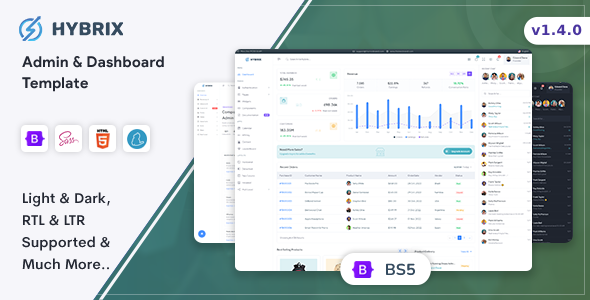
Hybrix sports a clean, modern, and professional aesthetic. The design is flat, with a subtle use of shadows to create depth. The default color palette is pleasant and business-like, based around shades of blue and gray. The typography is well-chosen, with clear hierarchies for headings and body text, ensuring excellent readability. Spacing and alignment are consistent across all components, which gives the entire interface a polished and cohesive feel. The UX is intuitive, with standard navigation patterns (a collapsible sidebar and a top navigation bar) that users will immediately understand.
Component Library Deep Dive
This is where Hybrix really shines. It's not just a re-skinned Bootstrap. The template provides a vast library of custom-styled components that extend Bootstrap's core offering.
-
Forms: The form elements are a significant upgrade. You get beautifully styled text inputs, selects (using a library like Select2 for advanced functionality), checkboxes, radio buttons, file inputs, and date pickers. The validation states (success, error) are clear and well-designed.
-
Cards and Widgets: The dashboard is built on a system of cards and widgets. Hybrix provides dozens of variations: cards with headers, footers, images, icons, and various content types. These are the fundamental building blocks for any dashboard, and the variety here is impressive.
-
Alerts and Modals: The alerts are colorful and come with icons, making them more visually communicative than Bootstrap's defaults. The modals are also enhanced, with different sizes and styles available for various use cases (e.g., confirmation dialogs, information pop-ups).
-
Buttons and Badges: You get the standard set of Bootstrap buttons, but with a refined style. There are also icon buttons, social media buttons, and button groups. The badges are equally well-designed, perfect for status indicators or notification counts.
Dashboards and Data Visualization
Hybrix comes with multiple dashboard variations, including layouts for Analytics, E-commerce, and CRM. These aren't just rearranged widgets; they are thoughtfully designed starting points. The Analytics dashboard features prominent charts for tracking traffic and user engagement. The E-commerce dashboard focuses on sales metrics, order lists, and top products.
The integration of ApexCharts is a major plus. The chart examples provided are not just simple line or bar charts. You get examples of radial bars, heatmaps, candlestick charts, and various combinations. The code to generate these charts is provided in the page source, making it straightforward to see how to hook them up to a live data source via an API. The charts are fully responsive and interactive, with tooltips and animations that enhance the user experience.
Data Tables
No admin panel is complete without robust data tables. The integration of the DataTables.net library is seamless. The tables are styled to match the rest of the template and come pre-configured with essential features like search/filtering, pagination, and column sorting. The responsive behavior is also handled well; on smaller screens, the table can collapse to show additional data in an expandable child row, preventing ugly horizontal scrolling.
Part 4: Customization and Long-Term Maintainability
A template is only useful if you can make it your own. Hard-coded styles and tangled JavaScript can turn a promising template into a maintenance nightmare. We need to assess how easy it is to re-brand and extend Hybrix.
Theming with SCSS Variables
This is the most critical aspect of customization. Navigate to src/scss/abstracts/_variables.scss. This file is the control panel for the entire template's visual identity. Here you can find and modify SCSS variables for:
-
Colors:
$primary,$secondary,$success,$danger, etc. Changing the$primarycolor variable from its default blue to, say, a green, and then recompiling the assets (which Gulp does automatically) will instantly change the color of all primary buttons, links, and active navigation items across the entire application. -
Typography: You can easily change the base font size, font family (
$font-family-sans-serif), and heading weights. -
Spacing and Borders: Variables for
$spacer,$border-radius, and$card-border-widthallow you to control the global spacing and look of components.
This centralized variable management is exactly what a professional workflow demands. It ensures consistency and makes re-branding the template for a client a task of minutes, not days. This approach is far superior to buying cheap themes from places like gplpal that may not have such a well-structured codebase, even though the initial cost might be lower.
Adding New Pages and Components
The modular structure, thanks to the gulp-file-include plugin, makes adding new pages simple. To create a new page, you can duplicate an existing HTML file in the src/html/ directory. The file will look something like this:
<!DOCTYPE html> <html lang="en"> <head> @@include('../partials/head.html') <title>New Page</title> </head> <body> @@include('../partials/sidebar.html') <div class="main-content"> @@include('../partials/header.html') <!-- Your Page Content Goes Here --> </div> @@include('../partials/scripts.html') </body> </html>
The @@include directives tell the build process to inject the content of those partial files. This means you don't have to copy and paste the header, sidebar, and footer for every single page. You can just focus on the unique content for your new page. This is a robust system that drastically reduces code duplication and the potential for errors.
Part 5: The Final Verdict - A Tool for Professionals
After a thorough technical review, it's clear that Hybrix is more than just a pretty face. It's a well-engineered and thoughtfully constructed tool designed for professional developers.
Strengths
-
Modern Tech Stack: Built on Bootstrap 5 and SCSS, it avoids legacy dependencies like jQuery and embraces a modern front-end workflow.
-
Excellent Code Organization: The file structure is logical, and the code is clean, readable, and maintainable.
-
Painless Build Process: The Gulp-based workflow is simple to set up and provides essential features like live-reloading and asset compilation out of the box.
-
Highly Customizable: The extensive use of SCSS variables makes re-branding and theming incredibly efficient.
-
Comprehensive Component Set: It offers a vast library of pre-styled components and pre-built pages that cover the vast majority of web application UI needs.
Areas for Improvement
-
Lack of Framework Versions: The biggest drawback is that this is an HTML/CSS/JS template only. There are no official versions for React, Vue, or Angular. A developer using one of these frameworks would need to manually deconstruct the HTML and convert the components, which is a significant undertaking.
-
Documentation: While the code itself is quite clear, the written documentation could be more comprehensive. A bit more detail on the JavaScript architecture and how to initialize specific plugins would be beneficial for less experienced developers.
Who is Hybrix For?
This template is ideal for a specific type of developer and project:
-
Freelancers and Small Agencies: Perfect for rapidly building custom dashboards and admin panels for client projects that are based on traditional server-side frameworks like Laravel, Django, Ruby on Rails, or even a classic PHP application.
-
Startups Building an MVP: When speed is critical, Hybrix provides all the UI components needed to get a functional and great-looking product back-end built in record time.
-
Developers who prefer control: For those who don't want the overhead and opinionated nature of a full-blown JavaScript framework for their admin panel, this template offers a perfect balance of features and flexibility.
In essence, Hybrix is a professional-grade tool that respects the developer's time. It provides a solid, maintainable, and customizable foundation that significantly accelerates the development of web application back-ends. While those looking for a turn-key React or Vue solution will need to look elsewhere, developers working in the vast ecosystem of server-rendered applications will find Hybrix to be an exceptional value proposition. It strikes a fantastic balance, much like finding high-quality but affordable options when you search for Free download WordPress themes; you get a professional outcome without an enterprise-level cost or complexity.
评论 0