DreamsChat iOS & Firebase: A Senior Developer's Technical Review and Setup Guide - Free
DreamsChat iOS & Firebase: A Senior Developer's Technical Review and Setup Guide
Building a real-time chat application from the ground up is a rite of passage for many developers, but it's also a notorious time sink. The complexities of managing real-time data streams, user authentication, media uploads, and a responsive UI can derail a project for weeks, if not months. This is the exact problem that code templates aim to solve. Today, we're doing a deep dive into one such solution: the DreamsChat - Native iOS Chat App with Firebase, Group Chat & Media Sharing. This isn't a surface-level review; we're going to tear down the codebase, analyze its architecture, walk through a complete production-ready setup, and deliver a verdict on whether it's a valuable accelerator or just a well-packaged headache.
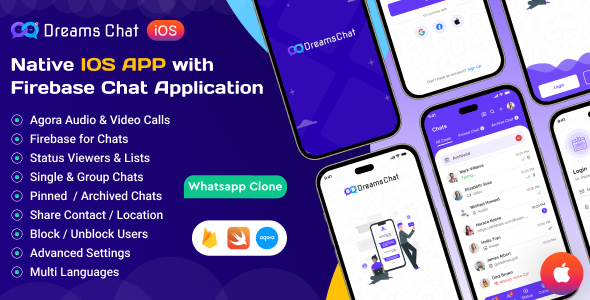
Part 1: The First Impression — Unpacking the Codebase
Upon unzipping the DreamsChat project, the first thing a seasoned developer looks for is structure. A clean, organized project directory is often a leading indicator of the code quality within. DreamsChat presents a standard Xcode project structure, which is immediately familiar. You get the main project folder, a Podfile for dependencies, and the .xcworkspace file. It's what you expect, and that's a good thing—no strange proprietary build systems or convoluted scripts to wrestle with.
Dependencies and Project Architecture
The project uses CocoaPods for dependency management. While Swift Package Manager (SPM) is gaining favor for its native integration with Xcode, CocoaPods is still the undisputed king for its vast library support, and its presence here is perfectly acceptable. Opening the Podfile reveals the core of the application's backend and utility stack:
-
Firebase/Auth: For user registration and login. Standard.
-
Firebase/Firestore: The NoSQL database for storing user data, chat messages, and group information. The heart of the real-time functionality.
-
Firebase/Storage: For handling media uploads like images and videos.
-
Firebase/Messaging: For push notifications, a critical component for any modern chat app.
-
SDWebImage: A ubiquitous library for asynchronous image downloading and caching. A smart choice to prevent UI stuttering when loading profile pictures and shared media.
-
MBProgressHUD: A simple, effective library for displaying loading indicators.
The selection of pods is pragmatic and battle-tested. There are no obscure or poorly maintained libraries that would raise red flags for a long-term project. This is a solid foundation.
Digging into the source files, the architecture appears to be a classic Model-View-Controller (MVC) pattern. While the industry has largely shifted towards Model-View-ViewModel (MVVM) or other more modular patterns to improve testability and separation of concerns, MVC is still Apple's default and is perfectly functional for small to medium-sized apps. However, this is my first point of critique. In some places, the MVC pattern is stretched to its limits. For example, the ChatViewController.swift file is quite hefty. It seems to handle not just the UI presentation but also a significant amount of data fetching logic, message sending, and listener management directly from Firestore. In a production environment, my first refactoring task would be to pull that Firebase logic into a dedicated ChatService or FirestoreManager class to slim down the view controller and make the business logic reusable and easier to test.
Code Quality and Readability
The code is written entirely in Swift. The style is generally clean and follows Swift's modern conventions. Variable and function names are descriptive, and the project avoids the "Objective-C-in-Swift-syntax" trap that plagues some older templates. There's a decent, if not exhaustive, use of comments, particularly around the more complex Firebase query logic.
One positive aspect is the use of a Constants.swift file to manage Storyboard IDs, cell identifiers, and Firestore collection names. This is a good practice that centralizes key strings, making refactoring and maintenance significantly easier. Instead of hunting through a dozen files to change a collection name, you have a single source of truth.
However, error handling could be more robust. Many of the Firebase calls handle the success case but have a simplistic print(error.localizedDescription) in the failure closure. For a real-world app, you'd need to implement more user-friendly error handling—displaying alerts, implementing retry logic for network failures, and logging errors to a remote service for debugging.
Part 2: The Firebase Backend — A Closer Look at the Data Model
The entire backend of DreamsChat is powered by Google's Firebase, a choice that makes sense for this kind of template. It removes the need to build, host, and maintain a custom server, allowing developers to focus on the client-side experience. The implementation hinges on three core Firebase services.
Firestore Data Structure
The effectiveness of a Firestore-backed app lives and dies by its data structure. A poorly designed structure can lead to slow queries and expensive read/write costs at scale. DreamsChat employs a logical and fairly standard model:
-
Users Collection: A top-level collection named
userswhere each document ID is the user'suidfrom Firebase Authentication. Each document stores user information likename,email,profileImageURL, andfcmTokenfor push notifications. This is a scalable approach. -
Chats/Groups Collection: A top-level collection, let's call it
threads, holds the documents for both one-on-one and group chats. Each document might contain metadata likegroupName, a list ofparticipantIDs, andlastMessage. This structure is efficient for fetching a user's list of recent chats. -
Messages Subcollection: This is the most critical part. Inside each chat document in the
threadscollection, there's a subcollection namedmessages. Each document within this subcollection represents a single message, containing fields likesenderID,text,timestamp, andmediaURL. Using a subcollection for messages is the correct approach, as it allows you to load a chat's metadata without having to download all of its messages, and you can efficiently paginate messages using Firestore's query cursors.
This data model is solid. It's designed to query for chat lists efficiently and load individual chat threads on demand. The real-time updates are handled by attaching snapshot listeners (addSnapshotListener) to the messages subcollection of the currently open chat. When a new document is added to that subcollection, Firestore pushes the update to the app in near real-time, which then updates the UI. It's the standard, effective way to build a chat app on Firestore.
Authentication and Storage Security
Firebase Authentication is straightforwardly implemented for email and password sign-up. Extending this to include Google, Apple, or Facebook sign-in would be a relatively simple task using Firebase's documentation.
A more pressing concern for any developer using this template is security rules. The default Firestore and Firebase Storage security rules often start in a "test mode" that allows open read/write access. DreamsChat, being a template, can't ship with your specific production rules. It is absolutely critical that the developer who buys this template immediately writes and deploys proper security rules. For example:
Firestore Rules Example:
rules_version = '2'; service cloud.firestore { match /databases/{database}/documents { // Users can only read/write their own user document match /users/{userId} { allow read, write: if request.auth.uid == userId; } // A user can only read/write a thread if they are a participant match /threads/{threadId} { allow read, write: if request.auth.uid in resource.data.participantIDs;
  // Messages can only be created by participants, and they can only read messages
  match /messages/{messageId} {
    allow read: if request.auth.uid in get(/databases/$(database)/documents/threads/$(threadId)).data.participantIDs;
    allow create: if request.auth.uid in get(/databases/$(database)/documents/threads/$(threadId)).data.participantIDs
                  && request.resource.data.senderID == request.auth.uid;
  }
}
} }
Similarly, Firebase Storage rules must be configured to ensure that users can only upload to paths they're authorized for and can only read media from chats they are a part of. Leaving these open is a massive security vulnerability and can lead to huge cloud bills from abuse.
Part 3: The Installation and Configuration Guide
Let's get this running. The process is straightforward if you're familiar with the iOS and Firebase ecosystems, but a few steps can trip up newcomers. Follow this guide precisely.
Prerequisites
-
A Mac with the latest version of Xcode installed.
-
CocoaPods installed. If not, open Terminal and run
sudo gem install cocoapods. -
An Apple Developer account (required to run on a physical device).
-
The DreamsChat source code downloaded and unzipped.
Step 1: Create and Configure Your Firebase Project
-
Go to the Firebase Console and click "Add project".
-
Give your project a name (e.g., "MyChatApp") and follow the on-screen steps. Disable Google Analytics for now if you wish.
-
Once your project is created, you'll be on the project dashboard. Click the iOS icon to add an iOS app.
-
iOS bundle ID: This is critical. Open the DreamsChat project in Xcode. Click on the top-level project file, select the "DreamsChat" target, and go to the "Signing & Capabilities" tab. You'll see the "Bundle Identifier". It will be something like
com.dreamstechnologies.dreamschat. You MUST change this to something unique to you, likecom.mycompany.mychatapp. Copy this unique ID and paste it into the "iOS bundle ID" field in Firebase. -
Give the app a nickname and click "Register app".
-
Download
GoogleService-Info.plist: Firebase will now prompt you to download a configuration file. Download this file. This file contains all the keys the app needs to connect to your specific Firebase project. -
Skip the next steps in the Firebase console for now (Add Firebase SDK, Add initialization code) as they are already handled by the template. Click "Continue to console".
Step 2: Set Up Firebase Services
-
In your Firebase project, go to the "Authentication" section in the left-hand menu. Click "Get started", then select the "Email/Password" provider and enable it.
-
Next, go to the "Firestore Database" section. Click "Create database". Start in test mode for now. This allows open access for 30 days. Remember to add the security rules discussed earlier before going live! Choose a Cloud Firestore location closest to your user base.
-
Finally, go to the "Storage" section. Click "Get started" and follow the prompts, again starting in test mode.
Step 3: Integrate Firebase with the Xcode Project
-
Find the
GoogleService-Info.plistfile you downloaded. Drag and drop it into your Xcode project. Make sure it's placed inside the main "DreamsChat" group (the folder icon). When the dialog box appears, ensure "Copy items if needed" is checked and that the file is added to the "DreamsChat" target. -
Close Xcode completely.
-
Open the Terminal app, navigate to the root directory of your unzipped DreamsChat project (the folder containing the
Podfile). -
Run the command
pod install. This will download all the Firebase libraries and other dependencies and link them to the project. It will create a new file:DreamsChat.xcworkspace. -
From now on, you must ONLY open the project using the white
.xcworkspacefile, not the blue.xcodeprojfile. This is the most common mistake people make.
Step 4: Final Build and Run
-
Open the
DreamsChat.xcworkspacefile in Xcode. -
Connect a physical iPhone or select an iOS Simulator.
-
If using a physical device, you will need to select your team under the "Signing & Capabilities" tab to sign the app.
-
Press the "Run" button (the play icon) in the top-left of Xcode.
The app should now build and launch. You can create a new account, and it will be saved in your own Firebase backend. If you create a second account on another simulator or device, you can start a chat between them and see the real-time functionality in action.
Part 4: Feature Review and Customization Potential
Beyond the basic setup, how do the advertised features hold up?
-
Group Chat: The implementation is robust. Creating a group simply involves creating a new document in the
threadscollection and adding multipleparticipantIDs. The logic correctly broadcasts messages to all participants who are listening. -
Media Sharing: This works as expected. When a user selects an image or video, the app uploads it to a predefined path in Firebase Storage. Once the upload is complete, it gets the public URL and saves it in a new message document in Firestore. The
SDWebImagelibrary then handles the efficient loading of this URL on the recipient's device. The one missing piece is sophisticated compression; for a production app, you would want to add client-side logic to compress images and videos before uploading to save storage costs and reduce upload times. -
User Presence (Online/Offline): The template includes a basic online status indicator. This is often implemented using Firebase Realtime Database's
onDisconnectfeature, which is more reliable for presence than Firestore alone. It works by setting a user's status to "online" when they connect and queueing anonDisconnectoperation to set their status to "offline" if the connection is lost. It's a tricky feature to get 100% right, and the implementation here is a great starting point but may require fine-tuning for edge cases. -
UI/UX and Customization: The UI is clean, modern, and clearly inspired by popular chat apps like WhatsApp and Telegram. It's built using UIKit and Storyboards. This makes it very accessible for developers to visually change layouts, colors, and fonts directly in Interface Builder. If you want to change the primary color scheme, for instance, it's a matter of finding the relevant color assets or changing properties in the Storyboard, rather than hunting through code. Programmatic UI purists might prefer SwiftUI, but for a template designed for broad appeal and easy modification, the Storyboard approach is a sensible choice.
The Verdict: Is DreamsChat a Worthwhile Investment?
After a thorough review of the code, architecture, and features, the verdict on DreamsChat is strongly positive, with a few important caveats.
The Strengths:
-
Massive Time Saver: The amount of development time this template saves is enormous. Building this feature set from scratch, even for a senior developer, would take weeks. With this template, you can have a functioning, custom-branded chat app running on your own backend in a single afternoon.
-
Solid Foundation: The underlying choices—Swift, Firebase, and a standard MVC architecture—are reliable. The data model is scalable, and the core features are implemented logically. It's a foundation you can confidently build upon.
-
Complete Solution: It provides a functional front-end and a clearly defined backend structure. You aren't just getting UI components; you're getting a complete, end-to-end system.
The Weaknesses & Areas for Improvement:
-
Requires Refactoring for Scale: As mentioned, the "Massive View Controller" tendency in some areas means that for a very large, complex application, you will want to invest time in refactoring the logic into a more modular architecture like MVVM.
-
Security is Your Responsibility: This is not a weakness of the template itself, but a critical warning. You MUST implement your own Firebase security rules. Failing to do so is negligent.
-
Basic Error Handling: The current error handling is placeholder-level. A production app needs a more sophisticated system for notifying the user of network issues, authentication failures, etc.
Who is this for?
This template is ideal for a few key demographics. Startups and indie developers who need to quickly launch an MVP with chat functionality will find this invaluable. It lets them get to market fast. It's also an excellent learning tool for intermediate iOS developers who want to see how a real-world, complex app is constructed with a BaaS (Backend as a Service) platform. It provides a working example that is far more instructive than isolated tutorials.
It is likely not the right choice for a large enterprise team with deeply entrenched coding standards and a custom backend infrastructure. The effort to refactor and adapt it would likely outweigh the benefits. For everyone else, however, DreamsChat is a powerful and well-executed accelerator. It delivers on its promise, providing a feature-rich chat application codebase that can serve as a potent starting block for your next project. For developers looking for different kinds of tools, the main gplpal site has a variety of options, and they even offer things like Free download WordPress themes for web-focused projects.
评论 0