Pyro for Elementor: A Developer's Deep-Dive and Installation Guide - Free
Pyro for Elementor: A Developer's Deep-Dive and Installation Guide
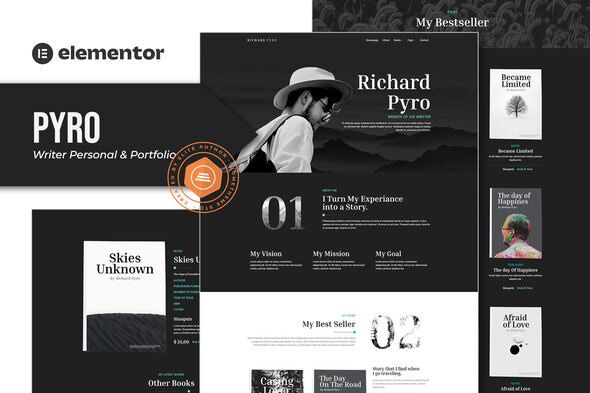
Every writer, author, and content creator eventually hits the same wall. You need a professional online portfolio, a digital home for your words, but the path there is littered with technical jargon, frustrating theme options, and the ever-present threat of a blank white screen. You want to showcase your writing, not spend a week wrestling with CSS. This is the exact pain point the Pyro - Writer Portfolio Elementor Template Kit aims to solve. It promises a visually striking, no-code solution for building a writer's website using the popular Elementor page builder. As a developer who has built countless custom WordPress sites and a journalist who understands the need for a clear narrative, I’m approaching this review from two angles. Does Pyro deliver a seamless experience for the non-technical writer? And from a developer's perspective, is it built on a solid foundation, or is it a house of cards waiting to collapse under the weight of customization?
What Exactly Is a "Template Kit"? A Critical Distinction
First, let's clear up a common and critical point of confusion. Pyro is an Elementor Template Kit, not a WordPress Theme. This isn't just semantics; it fundamentally changes how you install, manage, and think about your website's structure.
A WordPress theme (like Astra, Kadence, or GeneratePress) provides the entire structural framework for your site. It controls the underlying PHP files, the header, the footer, the blog archives—the very skeleton of your digital presence. You install it under Appearance > Themes.
A Template Kit, on the other hand, is a collection of pre-designed page layouts and sections that work on top of Elementor. Think of it as a set of sophisticated blueprints. It doesn't replace your theme; it works with it. The kit contains JSON files that tell Elementor how to arrange its widgets, what colors to use, which fonts to apply, and how to structure individual pages. This approach offers incredible design flexibility but introduces a new layer of dependency: your site's functionality is now intrinsically tied to the Elementor and Elementor Pro plugins.
Unboxing Pyro: The Initial Download and Dependencies
Upon downloading the Pyro kit, you get a single ZIP file. Inside, you won’t find the familiar style.css or functions.php of a theme. Instead, you'll see a collection of JSON files, a manifest.json, and possibly some settings files. Each JSON file represents a piece of the website: home.json, about.json, header.json, single-post.json, and so on.
Before you even think about uploading that ZIP, you must address the prerequisites. This is the first hurdle where many users stumble.
The Non-Negotiable Requirements:
-
A Basic Theme: You still need a theme installed. The best choice is a lightweight, bare-bones theme designed to work with Elementor, like the "Hello Elementor" theme. Using a heavy, feature-rich theme alongside an Elementor kit is like wearing two coats in summer—it’s redundant and will slow your site down.
-
Elementor (Free Version): This is the engine. You can get it from the WordPress plugin repository. It provides the core drag-and-drop interface and basic widgets.
-
Elementor Pro (Paid Version): This is the big one. Let me be direct: to use the Pyro kit as intended, Elementor Pro is not optional. The kit's most crucial components—the custom header, footer, blog post templates, and archive pages—are all built using Elementor Pro's Theme Builder functionality. Without it, you can only import the basic pages (like Home and About), leaving you with a disconnected, broken-looking site. This is the most significant hidden cost and a point of failure for anyone expecting a completely free ride.
The Installation Gauntlet: A Step-by-Step Field Guide
Marketing materials often depict installing a template kit as a magical one-click process. The reality involves a few more steps and requires careful attention to detail. Follow this guide precisely to avoid common pitfalls.
Step 1: Environment Preparation
Start with a clean WordPress installation. I can't stress this enough. Attempting to install a full-site kit like Pyro on an existing website cluttered with other plugins and theme settings is asking for conflicts.
-
Install and activate the "Hello Elementor" theme (
Appearance > Themes > Add New). -
Install and activate the free Elementor plugin (
Plugins > Add New). -
Install, activate, and authenticate your copy of the Elementor Pro plugin (
Plugins > Add New > Upload Plugin).
Step 2: The Import Process
Now we get to the main event. Forget the old way of importing single templates. Elementor has a streamlined Kit import tool.
-
In your WordPress dashboard, navigate to Elementor > Tools.
-
Click on the "Import / Export Kit" tab.
-
Under "Import a Template Kit," click the "Start Import" button.
-
Select the Pyro
.zipfile you downloaded from your computer.
Step 3: The Import Wizard - Read Carefully!
Elementor will scan the kit and present you with a checklist of what it's about to import. This screen is vital. It will typically show:
-
Templates: These are the individual page designs, headers, footers, and post layouts. You want all of these.
-
Site Settings: This is the global design system—colors, fonts, layout settings. Importing this ensures your site has the consistent look seen in the Pyro demo. I strongly recommend importing this.
-
Content: This includes the actual pages, posts, and Elementor-specific content used in the demo.
A dialog box will appear, warning you that this will override your existing Site Settings. Since you're on a clean install, this is exactly what you want. Check all the boxes and proceed. The import process can take a minute or two as it unpacks and configures everything.
Step 4: The Post-Import Reality Check
Once the import finishes, you might visit your homepage and find... it doesn't look quite right. This is normal. The import process is powerful, but it's not perfect. Here’s the manual cleanup every developer expects to do:
1. Assign the Header and Footer: The templates are imported, but WordPress doesn't know it should use them.
-
Go to Templates > Theme Builder.
-
You will see a Header and Footer template imported from Pyro. Each will likely have a "No Display Conditions" warning.
-
Click "Edit Conditions" for the Header, select "Include: Entire Site," and save.
-
Repeat the exact same process for the Footer.
2. Configure Archive and Single Post Templates: Do the same for your blog. In the Theme Builder, find the Archive template, click "Edit Conditions," and set it to display on "All Archives." For the Single Post template, set its condition to "Posts > All." Now, when someone views your blog page or clicks on a post, they will see the Pyro design instead of the theme's default layout.
3. Set the Homepage: WordPress still needs to be told which of your pages is the front door.
-
Go to Settings > Reading.
-
Under "Your homepage displays," select "A static page."
-
For the "Homepage" dropdown, choose the "Home," "Front Page," or similarly named page that was imported by the kit.
4. Re-link the Navigation Menu: The import tool rarely builds the navigation menu correctly.
-
Go to Appearance > Menus.
-
Create a new menu. Give it a name like "Main Menu."
-
Add the pages you want (Home, About, Books, Blog, Contact) from the left-hand panel to the menu structure.
-
Save the menu. You don’t need to assign a "Display location" here, because the Elementor header template will call the menu directly. You may need to edit the Header template and ensure its Navigation widget is set to use the "Main Menu" you just created.
After these manual steps, your site should finally mirror the Pyro demo. It's more involved than a simple click, but it gives you a foundational understanding of how your site is pieced together.
A Developer's Critique: Design, Structure, and Responsiveness
With the site up and running, it's time to put on the critic's hat. How does Pyro hold up under scrutiny?
Design and Aesthetics
Pyro's design is clean, modern, and unequivocally professional. It leans into a sophisticated, almost literary aesthetic with its use of a serif font for headings and a highly readable sans-serif for body copy. The default color palette is a muted, earthy scheme that feels grounded and serious—perfect for an author, journalist, or academic. It avoids the garish colors and flashy animations that plague many cheaper templates. The use of white space is excellent, giving the content room to breathe and directing the user's eye effectively. This isn't a template designed for a flashy startup; it's designed to make words the hero, which is precisely the point.
Template Quality and Completeness
A kit is only as good as its parts. Pyro provides a comprehensive set:
-
Homepage: Well-structured with a clear hero section for a writer's mission statement, followed by sections for featured books/publications, a brief bio, and a call to action for the blog. It's a solid narrative funnel.
-
About Page: A good mix of personal storytelling sections and more structured "credentials" areas. It avoids the "wall of text" trap.
-
Books/Portfolio Page: This is a key page. Pyro offers a clean grid layout for showcasing book covers or featured articles. The corresponding "Single Book" template is also well-designed, providing a dedicated layout for a synopsis, reviews, and purchase links. This is a huge value-add.
-
Blog (Archive & Single Post): The blog archive is a simple, elegant list. The single post template is where it shines. It's designed for maximum readability with a generous content width and clean typography. It's a reading experience, not just a content container.
-
Contact Page: Simple, effective, with a contact form and space for social links. It does the job without unnecessary frills.
Responsiveness and Mobile Experience
I resized my browser window from 4K down to a 320px mobile view, and the results were largely positive. The templates adapt well. Columns stack logically, font sizes scale down appropriately, and the Elementor header morphs into a standard, functional hamburger menu. I did notice one minor issue on the homepage where a three-column section felt a bit cramped on smaller tablet sizes before collapsing to a single column, but this is a minor tweak that a user could easily fix in Elementor's responsive mode. Overall, it's a solid 8/10 for mobile-friendliness out of the box.
Code and Performance Concerns
Since this is a template kit, we aren't looking at PHP code, but rather the structure of the Elementor build. Pyro appears to be built cleanly. It relies heavily on core Elementor and Elementor Pro widgets, which is good for stability and long-term maintenance. It doesn't seem to require a slew of third-party "Essential Add-ons" or "Premium Widgets" plugins, which often add bloat and create potential security vulnerabilities. The use of Global Colors and Fonts is also implemented correctly, meaning you can change the main heading color in one place (Site Settings) and it will update across the entire site. This is a hallmark of a well-constructed kit.
However, any site built with a page builder like Elementor carries a performance overhead. The generated HTML can be div-heavy, and it loads extra CSS and JavaScript. Out of the box, a site built with Pyro won't win any speed awards without optimization. You will absolutely need a good caching plugin (like WP Rocket or Litespeed Cache) and image optimization (like ShortPixel) to achieve good PageSpeed scores.
Real-World Use: Who Is Pyro Really For?
This brings us to the most important question: who should use this kit?
Pyro is an excellent fit for:
-
The DIY Author: You've written a book (or several) and need a professional web presence yesterday. You're comfortable with basic WordPress concepts but don't want to code. The cost of Elementor Pro plus the kit is far less than hiring a developer.
-
The Freelance Writer or Journalist: You need a portfolio that showcases your published articles elegantly. The blog and portfolio templates are perfect for this.
-
The "Time is Money" Developer: As a developer, I wouldn't use this for a high-end, completely custom client project. But for a smaller budget client who needs a quick, good-looking writer site? Absolutely. It serves as a fantastic accelerator, saving dozens of hours of design and development work.
You should probably avoid Pyro if:
-
You are on a zero-dollar budget: The dependency on Elementor Pro is a deal-breaker.
-
You are a complete WordPress novice: While it's "no-code," the post-import cleanup requires a basic understanding of the WordPress dashboard, menus, and settings.
-
You are a performance purist: If you demand a 100/100 PageSpeed score and hand-coded perfection, a page builder template kit is not the tool for you.
The GPL Consideration
Many users will acquire this template kit from a GPL club like gplpal. This is a cost-effective way to access premium tools, as WordPress and its derivative works (like themes and plugins) are licensed under the General Public License. This means you can legally and safely download and use the software. The trade-off? You don't get direct customer support from the original developer. You're responsible for installation and troubleshooting. This is precisely why a detailed, realistic guide like this one is so valuable. You get the tool at a fraction of the price, but you must be prepared to be more self-reliant. For many, this is a perfectly acceptable and empowering trade-off.
The Final Verdict
The Pyro - Writer Portfolio Elementor Template Kit is a high-quality, well-designed, and thoughtfully constructed product. It successfully achieves its goal of providing writers with a powerful tool to build a beautiful portfolio without writing a line of code. Its design is sophisticated and appropriate for its target audience, and its structure is sound from a developer's standpoint.
However, it is not a "one-click" magic button. The process requires a clean setup, the mandatory purchase of Elementor Pro, and a series of crucial post-import configuration steps. Users must go in with realistic expectations and the understanding that they are using a professional tool that requires a small amount of learning. Pyro is an accelerator, a launchpad, a massive head start. It takes you 90% of the way there, leaving the final 10%—the content, the images, and the personal touches—to you. For any writer looking to take control of their online identity, that's a powerful and worthwhile proposition. If this particular style doesn't fit your needs, the world of template kits is vast, and you can explore a wide variety of Free download WordPress themes and kits to find the perfect starting point for your next project.
评论 0