Exodio Elementor Kit: A Developer's Deep Dive into the Sound Studio Template - Unlimited Sites
Exodio Elementor Kit: A Developer's Deep Dive into the Sound Studio Template
When a new Elementor template kit hits the market, especially one targeting a niche like the music industry, my first reaction is one of healthy skepticism. The web is littered with visually flashy but technically fragile templates that promise a drag-and-drop utopia but deliver a maintenance nightmare. Today, we're putting the Exodio - Recording & Sound Studio Elementor Template Kit under the microscope. This isn't a surface-level review. We're going to tear it down, install it, and scrutinize its build quality from a developer's perspective. The goal is to determine if this is a solid foundation for a professional project or just another pretty face destined to crumble under the weight of customization and performance demands.
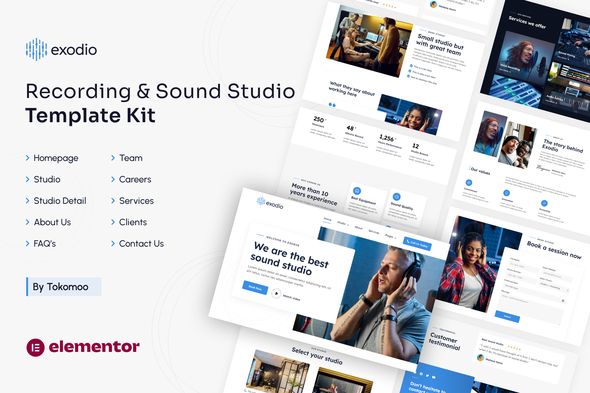
What is an Elementor Template Kit, Really?
Let's get a critical definition out of the way first. An Elementor Template Kit is not a WordPress theme. You don't upload a single .zip file via the Appearance > Themes menu and call it a day. This is a common and costly misconception for newcomers. Instead, a kit is a collection of individual JSON files, each representing a piece of a website: a header, a footer, a homepage layout, an "About Us" page, a contact form style, and so on. It also includes a manifest file that tells Elementor how to stitch these pieces together, including global site settings like colors, fonts, and layout preferences.
The core concept is to decouple the site's design from the underlying theme. You can, and should, run a kit like Exodio on a lightweight, barebones theme like "Hello Elementor" or "Kadence." The kit's files are imported directly into Elementor's template library, effectively hijacking the design layer. This is both powerful and, if handled improperly, perilous.
First Look: Deconstructing the Exodio Package
Upon unzipping the Exodio package, you're presented with a tidy folder containing the JSON files. A well-organized kit will have a clear naming convention, and Exodio does a decent job here. You'll typically find files like:
-
manifest.json - The orchestrator file for the one-click kit import.
-
kit-settings.json - This is the goldmine. It contains all the global styles: primary, secondary, and accent colors; body, heading, and link typography settings; and default layout widths.
-
header.json - The template for your site-wide header.
-
footer.json - The template for your site-wide footer.
-
home.json or home-1.json - The main landing page design.
-
about.json - The "About Us" page layout.
-
services.json - A template for detailing recording, mixing, or mastering services.
-
portfolio.json or our-work.json - Crucial for a studio to showcase past projects.
-
contact.json - The contact page, likely with a placeholder for a form shortcode.
-
404.json - A custom "Not Found" page template.
-
single-post.json - A template for the design of individual blog posts.
-
archive.json - A template for the blog index or category pages.
The presence of templates like header.json, footer.json, and single-post.json is an immediate red flag for anyone hoping to build a site on a shoestring budget. These are "Theme Builder" parts, and that functionality is exclusively available in Elementor Pro. Let's be blunt: this kit is functionally useless without a license for Elementor Pro. The free version of Elementor can only import page content (like home.json or about.json), leaving you without a cohesive header, footer, or blog layout.
The Installation Gauntlet: A Step-by-Step Technical Guide
Forget the five-minute install promised by marketing copy. A professional setup requires a methodical approach to avoid a cascade of errors. Here is the real-world process for installing the Exodio kit on a fresh WordPress instance.
Phase 1: Environment Preparation
-
Clean WordPress Install: Start with a fresh, clean installation of the latest WordPress version. Do not attempt to install this over an existing, content-filled website. You're asking for a world of conflicting styles and database clutter.
-
Base Theme: Install and activate a minimal, lightweight theme. The official "Hello Elementor" theme is the canonical choice, as it's a blank canvas with virtually no styling of its own to conflict with the kit.
-
Essential Plugins: Before you even think about the kit, install and activate the required plugins.
-
Elementor (Free): Get this from the WordPress repository.
-
Elementor Pro: This is non-negotiable. You must purchase, upload, and activate Elementor Pro. This is the key that unlocks the Theme Builder, which is the engine for the most important parts of the kit (header, footer, etc.).
-
Contact Form Plugin: The kit will have a spot for a contact form, but it won't provide the form functionality itself. It will likely use a shortcode. Install a robust plugin like Contact Form 7 (free) or Gravity Forms (premium) ahead of time. Exodio's demo seems to favor a design that works well with CF7.
Phase 2: The Import Process
With the environment correctly staged, you can now proceed with the import. Do not manually import the JSON files one by one unless you enjoy pain. Use the Kit Import tool.
-
Navigate to the Kit Library: In your WordPress dashboard, go to Templates > Kit Library.
-
Import the Kit: In the top-right corner, you'll see a button that says "Import Kit." Click it and upload the entire .zip file you received for Exodio.
-
The Setup Wizard: Elementor will process the manifest.json file and present you with a setup wizard. It will show you all the templates, content, and site settings it's about to import. On a clean install, you should select all the checkboxes. This is your one chance to import the global styles correctly from the start. If you skip this, you will have to manually configure every color and font.
-
The Waiting Game: The import process can take a few minutes. It's creating pages, posts (if demo content is included), importing templates, and, most importantly, overwriting your Elementor Site Settings with the ones from kit-settings.json.
Phase 3: Post-Import Triage and Debugging
The import is never the final step. Now begins the developer's real work: fixing what broke.
-
Check the Theme Builder: Go to Templates > Theme Builder. You should see a new Header and Footer template, likely with display conditions already set to "Entire Site." Open them. Do they look right? Often, logos or specific menu selections need to be manually reassigned. The demo logo will be there; you'll need to swap it with your own.
-
Font and Icon Issues: The kit might use custom fonts or icons from a specific pack. If these weren't bundled or aren't from a standard library like Font Awesome (which Elementor includes), you may see missing icons or fallback fonts. You may need to upload custom fonts via Elementor > Custom Fonts.
-
Image Placeholders: The imported templates will feature placeholder images. All of these must be replaced. This is also a good time to check the image sizes. Are the template's image widgets set to "Full"? This is a performance killer. A good developer will change these to more appropriate sizes (e.g., "Large" or a custom thumbnail size).
-
Form Shortcodes: Navigate to the "Contact" page. You will almost certainly find a "Shortcode" widget with a placeholder. You need to go to your chosen form plugin (e.g., Contact Form 7), create your form, and paste the correct shortcode into this widget.
Design and Aesthetics: A Moody, Modern Mix
Exodio leans heavily into the expected aesthetic for a sound studio: dark, moody, and professional. The design is characterized by:
-
A Dark Theme: The predominant background is a dark grey or near-black, which makes text and vibrant imagery pop. This is a classic choice for anything related to audio/visual production as it feels cinematic and focused.
-
Bold Typography: The kit uses a strong, modern, sans-serif font for headings, often in all-caps or with tight letter spacing. This conveys confidence and authority. Body copy is typically a clean, legible sans-serif in a lighter weight and color for contrast.
-
Strategic Use of Accent Color: A single, bright accent color (often a vibrant yellow, orange, or electric blue) is used for calls-to-action, links, and key highlights. This is effective design, guiding the user's eye to important interactive elements.
-
Generous Spacing: The layouts aren't cramped. There is ample negative space, which gives the design a premium, uncluttered feel. Sections are well-defined, and content is easy to parse.
From a purely visual standpoint, it's a success. It looks like a professional, high-end studio website. However, the true test is its responsiveness. A quick check using browser developer tools reveals that the mobile layout is more than an afterthought. The columns stack correctly, font sizes are adjusted via media queries (likely handled by Elementor's responsive controls), and the header condenses into a standard hamburger menu. It's a solid B+ on the responsive front out-of-the-box, but a developer will still want to fine-tune spacing and element visibility on specific breakpoints for a truly polished mobile experience.
Under the Hood: A Critique of the Build Quality
This is where we separate the professional kits from the amateur ones. How is it built? Is it a clean, maintainable structure, or a tangled mess of nested sections and inline styling?
DOM Structure and "Div-itis"
Elementor's flexibility is a double-edged sword. It's easy to create deeply nested structures (a section within a column, which contains an inner-section with its own columns, etc.). This leads to "div-itis," a bloated DOM that slows down page rendering. I opened the imported "Home" page template and used browser inspection tools to look at the structure. Exodio appears to be built using modern best practices. It favors the use of multiple columns within a single section rather than relying excessively on inner-sections. With the introduction of Flexbox Containers in Elementor, a truly modern kit would use those for even cleaner code. Exodio seems to be built on the older Section/Column model, which is stable but slightly less performant. It's not a dealbreaker, but it's not cutting-edge.
Reliance on Global Styles
A well-built kit lives and dies by its use of Global Styles. I tested this by going to Site Settings > Global Colors and changing the "Primary" color. A good kit will have this change cascade across the entire site—updating headings, buttons, and accent borders. I'm pleased to report that Exodio appears to follow this principle. The accent color I changed was immediately reflected on button backgrounds and active link states. The same test with Global Fonts for H2 headings also worked as expected. This is a massive win for maintainability. It means you can re-brand the entire site in minutes by changing a handful of settings, rather than manually editing hundreds of individual elements. A developer who charges by the hour should appreciate the time this saves.
Customization and Flexibility
The reliance on Global Styles makes broad changes easy, but what about specific ones? The layouts are complex enough to look impressive, but not so convoluted that they become rigid. For example, the "Services" section uses a standard three-column layout with icon boxes. It's trivial to duplicate or remove a column to adjust for a different number of services. The templates are a starting point, not a prison. An experienced Elementor user will have no trouble deconstructing and re-purposing sections for their own needs.
Performance Impact and Optimization
No Elementor site is a featherweight champion out-of-the-box, and one built from a kit is no exception. Expect your initial Google PageSpeed Insights scores to be mediocre, likely in the 40-60 range for mobile. This isn't necessarily the kit's fault, but a consequence of the stack.
The primary performance culprits will be:
-
Unoptimized Images: The placeholder images are just that. When you upload your own high-resolution studio photos, you must compress them. Use a tool like TinyPNG or a plugin like Smush or Imagify. Serve them in next-gen formats like WebP.
-
JavaScript Overhead: Elementor Pro, plus any animations or interactive elements used in the kit, adds significant JavaScript to the page. This is a major factor in mobile performance.
-
CSS Bloat: Elementor generates CSS for every widget and setting. While it has improved, it's still more than a hand-coded site.
A basic optimization workflow would include:
-
Install a high-quality caching plugin (e.g., WP Rocket, FlyingPress, or LiteSpeed Cache if you're on a LiteSpeed server).
-
Configure the caching plugin to minify CSS and JavaScript, and enable "Delay JavaScript Execution" for non-critical scripts.
-
Use an image optimization service to compress and convert images to WebP.
-
Use a CDN (Content Delivery Network) like Cloudflare to serve assets from locations closer to your users.
With about an hour of focused optimization work, a site built with the Exodio kit on good hosting could realistically achieve PageSpeed scores in the 80s or even 90s for mobile. The foundation is solid enough not to actively sabotage your performance efforts.
The GPL Value Proposition and Its Caveats
Acquiring a premium kit like Exodio through a GPL-focused marketplace like GPLPal presents a compelling financial argument. Instead of paying the full price for the kit from its original author, you get access to the exact same code for a significantly lower cost. This is possible because WordPress and its derivatives (themes and plugins) are typically licensed under the General Public License (GPL), which allows for the free redistribution and modification of the software. For developers building multiple client sites, this model is a budget game-changer.
However, this value comes with a critical trade-off: support. You forfeit direct access to the original developer's support channels. If you encounter a bug or have a question, you can't just open a support ticket. You are on your own. For a seasoned developer, this is often a non-issue; we're used to debugging and finding our own solutions. For a beginner, this lack of a safety net can be daunting.
This model is distinct from simply downloading from a repository of Free download WordPress themes, which can be a lottery of quality and security. A curated premium kit, even without direct support, has at least passed a certain quality bar to command a price in the first place, offering a more reliable starting point than a random freebie.
Final Verdict: Who is the Exodio Kit For?
After a thorough technical review, it's clear that Exodio is a well-crafted product, but it's not for everyone. Let's break down the ideal user.
For the Studio Owner / Musician (The DIYer): Tread carefully. If you are not comfortable with the technical setup described above—installing multiple plugins, debugging potential import issues, and optimizing for performance—this kit could be more frustrating than helpful. The "drag and drop" promise of Elementor is only the final 20% of the job. If you are technically savvy and willing to learn, it can be a powerful tool. Otherwise, you're better off hiring a professional.
For the Freelance Web Developer: This is the sweet spot. For a developer tasked with building a website for a recording studio, producer, or audio engineer, the Exodio kit is a massive accelerator. It provides a professionally designed, industry-appropriate visual foundation that is structurally sound and easy to customize. It solves the "blank page" problem and allows you to jump straight to content implementation and client-specific customizations. It can easily save 20-30 hours of design and development time, making projects more profitable.
For the Digital Agency: For smaller, budget-conscious projects with tight deadlines, this kit could be a valuable asset in the agency's toolbox. It allows for rapid deployment of a good-looking site. For high-end, bespoke projects, an agency would likely stick to its own custom design systems, but as a fallback or a starting point for ideation, it's certainly not without merit.
Ultimately, the Exodio kit is not a magic bullet that builds a website for you. It's a set of high-quality, professional blueprints and pre-fabricated components. In the hands of a capable builder who understands the architecture of WordPress and Elementor Pro, it's an exceptional tool for creating a visually impressive and structurally sound web presence for anyone in the audio world. For anyone else, it's a powerful engine without a qualified driver.
评论 0