Mathic Realm Review: A Developer's Deep Dive into this HTML5 Math Game - Unlimited Sites
Mathic Realm Review: A Developer's Deep Dive into this HTML5 Math Game
In the world of web-based educational tools, finding a resource that is both engaging for users and straightforward for developers to deploy can be a challenge. We’re often faced with bloated frameworks, complex dependencies, or closed-source platforms that fight customization at every turn. That’s why I was keen to get my hands on Mathic Realm - HTML5 Math game, a self-contained package promising a simple, effective math game experience. This isn't just a user review; this is a technical breakdown and a full installation guide for web developers, educators with a technical streak, and website owners looking to add valuable, interactive content to their platforms. We'll tear it down to the studs, analyze the code, walk through deployment, and figure out if it’s a solid foundation or a digital house of cards.
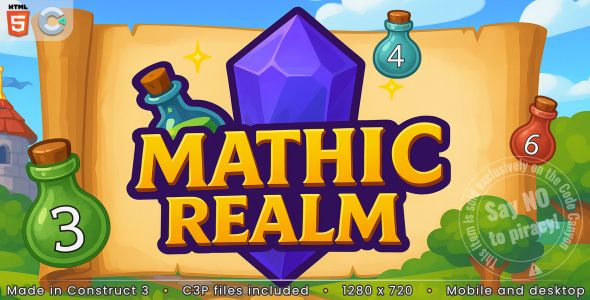
What You Get Out of the Box: The Player Experience
Before diving into the code, it's essential to understand the product from the end-user's perspective. Who is this for, and is it any good? Firing up Mathic Realm presents a clean, colorful, and decidedly kid-friendly interface. The aesthetic is bright and cheerful, with cartoonish elements and large, legible fonts that are well-suited for its target audience of elementary and middle school students. There are no complex menus or onboarding processes; you hit "Play," and you're immediately in the game.
The core gameplay loop is brutally simple and effective. The game presents a mathematical equation at the top of the screen—think "12 + 5 = ?"—and four potential answers appear in bubbles below. The player must click the correct bubble before a timer bar at the top runs out. A correct answer rewards the player with a satisfying "pop" and a point, while an incorrect answer or running out of time results in a loss of one of three lives. The game continues, with the difficulty subtly increasing, until the player runs out of lives. The final score is then displayed, encouraging another playthrough to beat the previous high score.
The game covers the four basic arithmetic operations: addition, subtraction, multiplication, and division. From what I can tell, the difficulty scaling works by introducing larger numbers and eventually mixing the operation types. This keeps the experience from becoming stale too quickly. The audio-visual feedback is responsive and provides clear reinforcement for correct and incorrect answers, which is crucial for educational software.
From a purely functional standpoint, it works. It’s a no-frills digital flashcard system with a timer. It doesn’t have the narrative depth of a AAA title, but it’s not trying to. Its purpose is to provide quick, repetitive practice in a slightly more engaging format than a worksheet, and at that, it succeeds. However, the lack of a persistent high-score board or user profiles means the replayability is entirely intrinsic. A student needs to be motivated to beat their own score, as there's no built-in competition or progression system beyond the single session.
Deconstructing the Codebase: The Developer's Perspective
Unzipping the download package is where the real analysis begins for a developer. The initial impression is one of refreshing simplicity. There's no npm install, no Webpack configuration, and no labyrinthine folder structure. It's a throwback to a simpler era of web development, which is both a pro and a con.
File and Folder Breakdown
The project structure is flat and immediately understandable:
-
index.html: The main entry point. This is the single HTML file that holds the structure for the game.
-
/css/: A single folder containing the stylesheet(s). Typically, you'll find a main.css or style.css file here that controls the entire visual presentation of the game.
-
/js/: The brains of the operation. This folder contains the JavaScript files. I expected to see a few files here, perhaps one for game logic (game.js), one for core mechanics (main.js), and maybe a library or two.
-
/assets/ (or /media/, /images/): This directory holds all the game's media. This includes the background images, button sprites, character art, and sound effect files (usually in .mp3 or s.ogg format).
This kind of structure is fantastic for beginners or for rapid deployment. You know exactly where everything is. There's no ambiguity. A senior developer might see this and immediately think about scalability issues, but for a single-purpose application like this, it's arguably the correct approach. It’s lean and mean.
The Tech Stack: Pure Vanilla?
Digging into the index.html and the /js/ folder reveals the game's technological underpinnings. Mathic Realm is built on what appears to be a combination of HTML5 Canvas and vanilla JavaScript, possibly with jQuery for DOM manipulation and event handling. The game logic itself—generating questions, tracking scores, handling user input—is likely written in pure JavaScript. The rendering of the game elements (the numbers, the bubbles, the timer) is handled by the HTML5 Canvas API.
This is a smart choice. Using a full-blown game engine like Phaser or PixiJS would be overkill for a project of this scope and would add significant weight to the download size. Relying on vanilla JS and the native Canvas API ensures the game is lightweight, fast-loading, and has zero external dependencies. This means it will run in any modern browser without a hitch and won't conflict with other JavaScript libraries you might be running on your website (a common headache when integrating third-party widgets).
Code Readability and Maintainability
This is where my critique becomes a bit sharper. While the project structure is simple, the code quality itself can be a mixed bag in these types of pre-packaged games. Often, the JavaScript is not written with modification in mind. I examined the core game.js file to assess its structure.
The code is functional, but it doesn't follow modern best practices like ES6 modules. It primarily uses global variables and functions, which can lead to scope pollution if you're not careful when integrating it into a larger site. For example, variables like score, lives, and currentQuestion are likely declared in the global scope.
That said, the code is not obfuscated or minified in the source package, which is a huge plus. The variable and function names are reasonably descriptive (e.g., generateQuestion(), checkAnswer(), updateTimer()). This means a developer with a basic understanding of JavaScript can read through the file and understand the flow of the game. You can pinpoint where the score is calculated, where the timer logic lives, and how the arithmetic problems are constructed. It's hackable, which I consider a major feature.
If I were to take this project on for serious customization, my first step would be to refactor the code. I would wrap the entire game logic in an Immediately Invoked Function Expression (IIFE) or a class to encapsulate all the variables and prevent them from leaking into the global scope. This would make it a much safer and more modular component to drop into any website.
Getting Mathic Realm Live: A Step-by-Step Guide
You’ve assessed the game, and you want to deploy it. Here’s the no-nonsense guide to getting it from a ZIP file on your desktop to a live, playable game on your website.
What You'll Need
-
The Mathic Realm game files (the downloaded ZIP).
-
A web server. This can be a local server for testing or your live web hosting account.
-
An FTP client (like FileZilla or Cyberduck) if you're uploading to a remote server.
-
A code editor (like VS Code, Sublime Text, or Atom) for any minor edits.
Step 1: Acquiring and Extracting the Files
This is the easy part. Download the ZIP file from the product page. Find a place on your computer for your project and extract the contents of the ZIP file into a new folder. I recommend naming it something simple like math-game.
Step 2: Running it on a Local Server
Do not just double-click the index.html file to open it in your browser. Modern browsers have security restrictions (CORS policies) that prevent web pages loaded from the local filesystem (file:///...) from loading other local files, like images and sounds. This will result in a broken game.
You need to serve the files from a proper web server, even on your local machine. The easiest way is using the "Live Server" extension in Visual Studio Code. Simply open the project folder in VS Code, right-click on index.html, and select "Open with Live Server."
If you don't use VS Code, you can use Python's built-in HTTP server. Open your terminal or command prompt, navigate to your math-game folder, and run this command:
python -m http.server
Then, open your browser and go to http://localhost:8000. You should now see the game running perfectly. Local testing is critical for making any customizations before you go live.
Step 3: Uploading to Your Web Host
Once you're happy with the game, it's time to upload it. You have two primary choices for where to put it:
-
Subdomain: games.yourwebsite.com/math-game/. This is a clean approach that keeps the game files separate from your main website's files. You would need to create a subdomain in your hosting control panel (like cPanel) and point it to a new directory.
-
Subdirectory: yourwebsite.com/games/math-game/. This is often simpler. You just create a new folder called
gamesinside your mainpublic_htmldirectory.
I prefer the subdirectory method for simplicity. Open your FTP client, connect to your web host, and navigate to your website's root directory (public_html or www). Create a new directory, perhaps named games. Inside that, upload the entire math-game folder containing all the game files. Once the upload is complete, you can access the game by navigating to yourwebsite.com/games/math-game/.
Step 4: Integration with WordPress
Many users will want to embed this game directly into a WordPress page or post. If you're running a site on WordPress, perhaps using one of the many themes from a marketplace like gpldock, integrating this game is straightforward. This process is similar for most themes, whether they are premium or from a collection of Free download WordPress themes.
The iFrame Method (Simple but Limited)
The quickest way to get the game into a WordPress post is by using an iframe. After uploading the game to a subdirectory as described above, simply edit the WordPress page or post where you want the game to appear. Switch to the "Text" or "HTML" editor view and paste the following code:
<iframe src="/games/math-game/" width="800" height="600" style="border:1px solid #ccc;"></iframe>
You'll need to adjust the width and height to fit your site's layout. While easy, iframes are not ideal. They can be tricky to make responsive, and the content inside the iframe is essentially invisible to search engines.
Advanced: Creating a Custom Page Template
A more robust and professional method is to create a custom page template within your WordPress theme. This approach avoids iframes and loads the game in a clean, full-screen environment. This is a developer-level task:
-
In your theme's folder, create a new file called
template-mathgame.php. -
At the very top of this file, add the template header: <?php / Template Name: Math Game / ?>
-
Copy the contents of the game's
index.htmlfile and paste them into this new PHP file. -
You'll need to adjust the paths to the CSS, JS, and image files. For example, change
css/style.cssto the full path:<link rel="stylesheet" href="/games/math-game/css/style.css">. -
Upload this
template-mathgame.phpfile to your active theme's directory. -
In the WordPress admin, create a new Page. On the right side, under "Page Attributes," you should now see a "Template" dropdown. Select "Math Game" and publish the page.
This method gives you a native, fast-loading page dedicated to the game, providing a much better user experience.
Making it Your Own: Customization and Monetization
The real value of a package like this isn't just in using it as-is, but in its potential for modification.
Reskinning the Game
Changing the look and feel is the most common customization. This is quite easy with Mathic Realm.
-
Images: All visual assets are in the
/assets/folder. Want a different background? Simply create a new image with the same dimensions and filename and replace the original. The same goes for buttons, characters, and other sprites. Using a tool like Photoshop or Photopea, you can completely rebrand the game in a few hours. -
Colors and Fonts: Open the
css/style.cssfile. Here you will find the CSS rules that define colors, fonts, and layout. The code is usually well-structured enough that you can find the styles for buttons (.button), the game container (#game-container), and text elements. Changing hex codes and font-family properties here will instantly update the look of the game.
Tweaking the Gameplay
This requires diving into the JavaScript. Open the game.js (or equivalent) file. You'll want to look for specific sections:
-
Difficulty: Look for a function like
generateQuestion(). Inside, you'll find the logic for creating the numbers. You can change theMath.random()multipliers to increase or decrease the range of numbers used. You could also add logic to introduce negative numbers or decimals. -
Timer: Find variables named
timerortimeLimit. Changing their initial value will make the game easier or harder. You might also find the function that decrements the timer, allowing you to change how quickly it drains. -
New Operations: For a more advanced challenge, you could try adding a new operation type, like exponents. This would involve updating the question generation logic and the answer evaluation logic.
Adding Revenue Streams
If you're deploying this on a high-traffic site, you might want to monetize it. Since you have full control over the index.html file, this is straightforward.
You can easily add Google AdSense ad slots. The best placement would be outside the main game container—perhaps a banner ad above the game and a rectangular ad below it. You would simply paste the AdSense code snippets into your index.html (or your custom WordPress template) in the desired locations. Avoid pop-up or interstitial ads that interrupt the gameplay, as that creates a poor user experience.
Final Analysis: Strengths, Weaknesses, and Who It's For
After a thorough technical review, Mathic Realm proves to be a very specific tool for a specific job.
The Good
-
Extremely Lightweight: With no external libraries and a minimal asset load, the game loads almost instantly on any decent connection.
-
Highly Deployable: The simple file structure means it can be deployed on any web server with minimal fuss. FTP upload and you're done.
-
Very Hackable: The use of unminified, commented vanilla JavaScript makes it an excellent base for developers to customize, extend, or learn from.
-
No Dependencies: It won't conflict with your existing website's tech stack (WordPress, Joomla, etc.). It’s a self-contained unit.
The Bad
-
Simplistic Gameplay: The core loop is repetitive and lacks long-term engagement features like leaderboards, achievements, or progression.
-
Dated Code Practices: The reliance on global variables and the lack of a modular structure is not in line with modern JavaScript development. It works, but it's not "best practice."
-
No Built-in Responsiveness: The game is designed for a fixed aspect ratio. While you can make the container responsive with CSS, the canvas element itself may not scale elegantly without additional JavaScript work to handle resizing.
The Verdict
So, is Mathic Realm worth it? It depends entirely on who you are. For a school or an educational blogger who needs to quickly add an interactive math tool to their site with zero development overhead, it's a home run. The "upload and play" nature is its biggest selling point. For a developer looking for a fun weekend project, this is a fantastic starting block. You can use it as a foundation to practice refactoring, add new features like a Firebase-backed leaderboard, or reskin it completely for a client.
However, if you are a non-technical user expecting a feature-rich, infinitely customizable game platform with a drag-and-drop interface, this is not for you. This is a component, a building block. It’s a well-made, simple machine that does one thing well. It's up to you, the developer or the technically-minded site owner, to integrate it into a larger system and build upon its solid, if simple, foundation.
评论 0